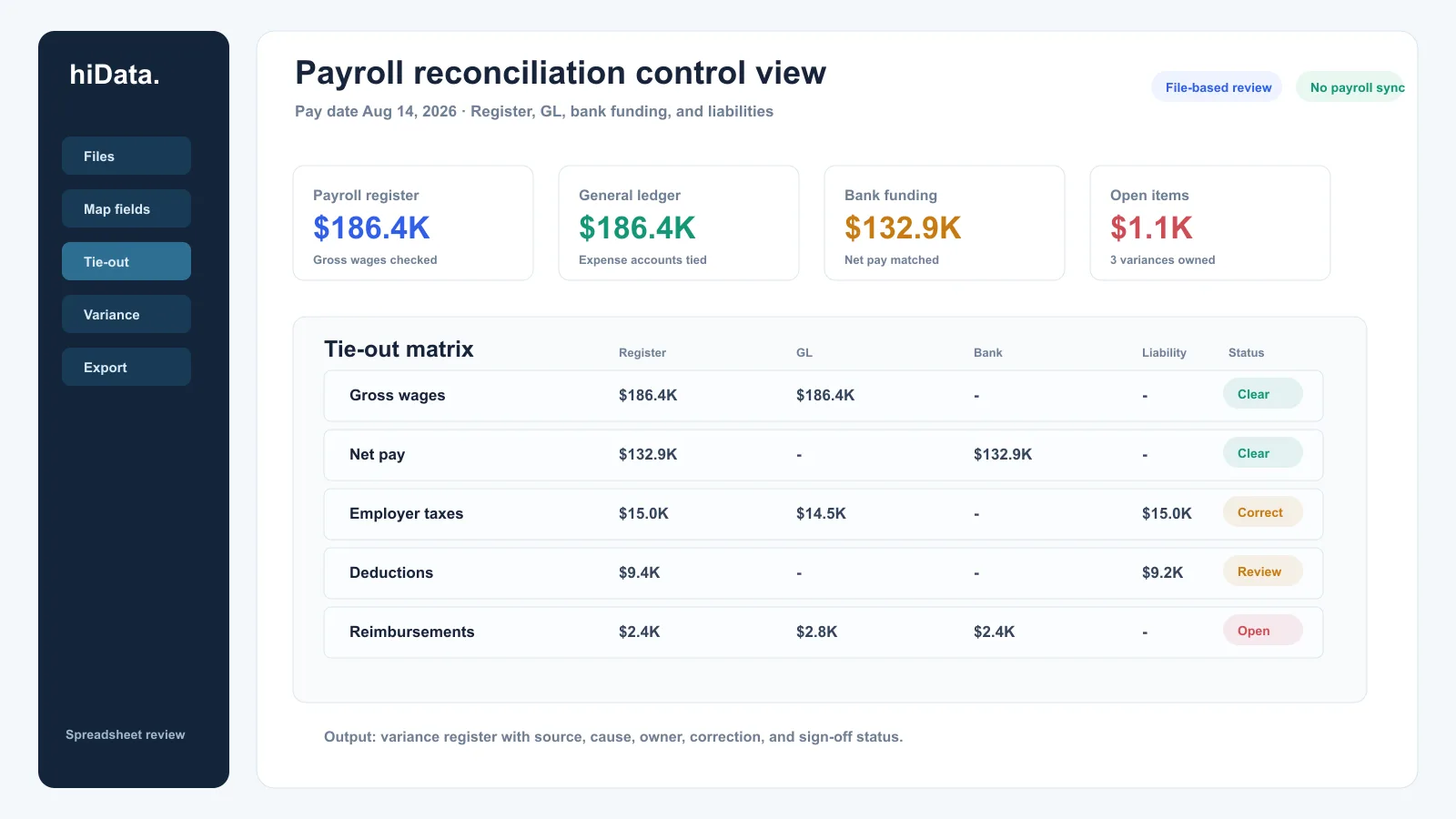
It is 4:20 p.m. on a Thursday, and payroll has already been approved for tomorrow's pay date. The payroll register looks clean, but the controller sees three numbers that do not line up: net pay in the bank file, wage expense in the general ledger, and payroll tax liabilities on the balance sheet.
That is the uncomfortable moment payroll reconciliation is meant to prevent.
Payroll reconciliation is the process of comparing payroll records, employee earnings, deductions, employer taxes, bank payments, and accounting entries so every payroll amount can be explained before and after it is posted. It helps teams catch overpayments, missing deductions, incorrect tax or benefit postings, bank mismatches, and payroll expenses that do not tie to the general ledger.
Payroll reconciliation key facts
| Question | Practical answer |
|---|---|
| What does it compare? | Payroll register, employee changes, time or earnings data, deductions, taxes, benefits, bank payments, and GL entries |
| When should it happen? | Before payroll release, after payroll posting, during month-end close, and before quarterly or year-end reporting |
| What is the core accounting tie-out? | Gross wages, employer taxes, employee deductions, benefit liabilities, net pay, and payroll clearing accounts |
| What should not be lumped together? | Net payroll cash, wage expense, payroll tax liabilities, benefit deductions, garnishments, reimbursements, and corrections |
| What is the final output? | A signed-off variance register and a reconciled payroll-to-GL trail |
| What should be documented? | Source files, report dates, payroll periods, variance causes, corrections, owners, and approval evidence |
Official payroll and employment-tax recordkeeping rules vary by record type and jurisdiction. U.S. federal guidance commonly requires payroll or employment tax records to be retained for multiple years, and state or local requirements may add more obligations. This guide is operational, not legal or tax advice; confirm the current rules with qualified payroll, tax, and legal advisors.
What is payroll reconciliation?
Payroll reconciliation is a control process that checks whether payroll has been calculated, paid, withheld, and posted correctly. A complete reconciliation does not stop at "total payroll cost." It explains each part of payroll:
- Gross wages and salary expense.
- Overtime, bonuses, commissions, tips, and other earnings.
- Employee deductions such as benefits, retirement contributions, garnishments, and other withholdings.
- Employer payroll taxes and employer-paid benefits.
- Net pay sent through payroll funding or direct deposit files.
- Payroll liabilities waiting to be remitted.
- General-ledger wage expense, tax expense, liability, and clearing accounts.
In simple terms, payroll reconciliation answers four questions:
- Did the right people get paid the right amounts?
- Were the right deductions and taxes withheld?
- Did bank payments match net payroll and related remittances?
- Did the general ledger record payroll expenses and liabilities correctly?
Payroll reconciliation vs payroll processing vs payroll accounting
These terms overlap, but they are not the same job.
| Area | Main question | Typical data | Output |
|---|---|---|---|
| Payroll processing | What should each employee be paid for this payroll run? | Time, salary, earnings, deductions, taxes, approvals | Approved payroll register and payment file |
| Payroll reconciliation | Do payroll, bank, and accounting records agree? | Payroll register, GL detail, bank activity, liability reports | Variance register and sign-off |
| Payroll accounting | How should payroll be recorded in the books? | Payroll journal entries, accounts, departments, entities | Wage expense, tax expense, liabilities, clearing entries |
Payroll processing creates the payroll result. Payroll accounting records it. Payroll reconciliation tests whether the result, cash movement, and accounting entries agree.
What records do you need for payroll reconciliation?
Start with source files that represent the same payroll period, pay date, entity, and currency. Mixing pay periods or report dates is one of the fastest ways to create false differences.
| Record | Why it matters | Review check |
|---|---|---|
| Payroll register | Shows employee-level earnings, deductions, taxes, and net pay | Confirm pay period, pay date, entity, and payroll version |
| Employee master changes | Explains new hires, terminations, pay-rate changes, departments, and tax setup | Review changes approved since the prior run |
| Time and attendance file | Supports hours, overtime, PTO, and shift differentials | Compare approved time to paid time |
| Deduction report | Supports benefits, retirement, garnishments, and other employee deductions | Tie deductions to employee elections or notices |
| Employer tax report | Separates employer payroll taxes from employee withholdings | Confirm account mapping and liability treatment |
| Benefits invoice or carrier file | Helps reconcile benefit deductions and employer benefit costs | Compare payroll deductions to vendor or carrier totals |
| Bank or funding file | Shows net payroll cash and related remittances | Match totals, dates, reversals, and failed payments |
| General-ledger detail | Shows payroll expenses, liabilities, and clearing accounts | Tie payroll journal entries to the payroll register |
| Prior-period variance log | Prevents old issues from disappearing | Confirm corrections were posted and closed |
The reconciliation is stronger when it stays detailed until exceptions are resolved. A single payroll total can hide a department coding issue, a duplicate employee payment, an unapplied reversal, and a liability account that did not clear.
Payroll reconciliation checklist
Use this checklist before payroll release and again after payroll is posted.
1. Freeze the payroll population
Confirm the employee population for the pay period. Review new hires, terminations, leave status, department changes, pay-rate updates, bank-account changes, and one-time payments.
The goal is not to re-approve every HR change. It is to make sure the payroll file reflects the approved population for this run.
2. Compare time, earnings, and pay rates
Review regular hours, overtime, PTO, bonuses, commissions, tips, retro pay, reimbursements, and manual adjustments. Look for unusual changes from the prior payroll run: large overtime increases, missing salary rows, duplicate one-time earnings, or terminated employees still paid.
3. Reconcile gross pay to the payroll register
Tie employee-level earnings to the payroll register total. Separate regular wages, overtime, bonuses, commissions, reimbursements, and taxable fringe items where possible. This makes later GL review much easier because each earning type may map to different accounts, departments, or entities.
4. Review deductions and employee taxes
Compare benefit deductions, retirement contributions, garnishments, post-tax deductions, and employee tax withholdings to the supporting reports. Confirm that deduction amounts are reasonable for the payroll period and that stopped deductions did not continue.
5. Review employer taxes and employer-paid benefits
Employer payroll taxes and employer-paid benefits should not be buried inside employee net pay. Reconcile them separately because they usually post to expense and liability accounts, not to payroll cash.
6. Match net pay to bank or funding records
Net pay should tie to the payroll funding amount or direct deposit file, adjusted for reversals, off-cycle payments, checks, failed payments, or manual corrections. If the bank total differs from net pay, identify whether the difference is timing, payment method, reversal, or error.
7. Tie payroll to the general ledger
Compare the payroll register and payroll journal entry to the GL. Review wage expense accounts, employer tax expense, benefit expense, employee deduction liabilities, payroll tax liabilities, cash, and payroll clearing accounts.
Do not force payroll to tie by changing one total. The tie-out should explain why each payroll component posted where it did.
8. Reconcile payroll liabilities
Liability accounts should roll forward logically. Beginning balance plus new withholdings or accruals, minus payments or remittances, should equal ending balance. Investigate old balances, negative balances, duplicate liabilities, and amounts that should have cleared after payment.
9. Create a variance register
Every discrepancy needs a clear status. At minimum, record the source, amount, cause, owner, correction method, due date, and sign-off status.
10. Archive evidence and sign off
Save the payroll register, GL detail, bank support, variance register, correction evidence, and approval trail. The final file should explain both the numbers and the review decisions.
Payroll reconciliation example
Assume payroll is reviewed for the August 14, 2026 pay date.
The amounts below are illustrative sample numbers for workflow explanation only. They are not customer data, benchmark data, or a claim about typical payroll variance levels.
| Check | Payroll register | Comparison source | Difference | Likely cause | Action |
|---|---|---|---|---|---|
| Gross wages | $186,420 | GL wage expense $186,420 | $0 | Ties | Sign off |
| Net pay | $132,870 | Bank funding $132,870 | $0 | Ties | Sign off |
| Employer taxes | $14,980 | GL payroll tax expense $14,520 | $460 | Department mapping missed one adjustment | Correct GL coding |
| Benefits deductions | $8,240 | Benefits liability $8,240 | $0 | Ties | Sign off |
| Garnishments | $1,180 | Liability account $980 | $200 | One remittance posted directly to expense | Reclass entry |
| Reimbursements | $2,350 | GL expense $2,750 | $400 | Duplicate manual reimbursement | Investigate before close |
This example shows why payroll reconciliation should not stop at net pay. Net cash tied perfectly, but employer taxes, garnishments, and reimbursements still needed correction.
Common payroll reconciliation discrepancies
| Issue | What it looks like | Why it matters | First check |
|---|---|---|---|
| Duplicate payment | Same employee has two similar payments or one off-cycle payment repeats | Overstates payroll cost and cash | Compare employee ID, pay date, and earning code |
| Missing employee | Approved employee is absent from the payroll register | Underpayment and employee-relations risk | Review new hires, leave status, and payroll batch filters |
| Terminated employee paid | Employee appears after termination date | Overpayment and reversal work | Compare termination date to pay period and pay date |
| Incorrect department coding | Payroll total ties, but department expense is wrong | Distorts reporting and budgets | Compare employee master to GL dimensions |
| Deduction mismatch | Benefit or retirement deductions do not match support | Employee balance or vendor liability issue | Compare deduction reports to election or carrier files |
| Tax liability mismatch | Payroll tax expense or liability differs from payroll report | Filing or remittance review needed | Separate employee withholding from employer tax |
| Bank timing difference | Payroll register and bank activity differ by date | Could be timing, failed payment, reversal, or error | Check funding date, pay date, and payment status |
| Old clearing balance | Payroll clearing account does not return to expected balance | Payments, liabilities, or entries may be stuck | Roll forward the clearing account |
Turn payroll reconciliation into a variance review
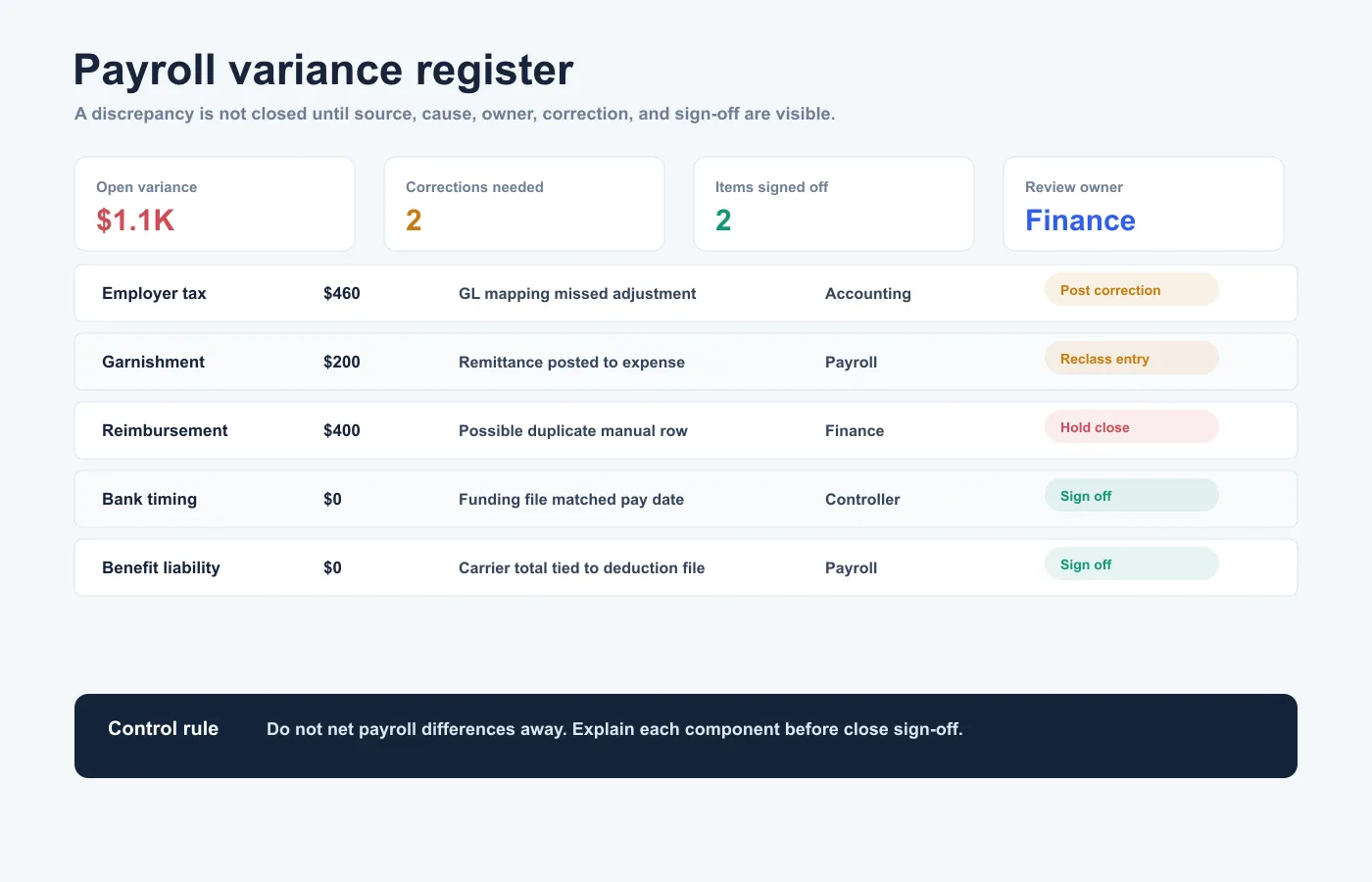
A useful variance review is short, owned, and actionable.
| Status | Use when | Required next step |
|---|---|---|
| Clear | Difference is explained and no entry is needed | Add note and sign off |
| Correct | Payroll or GL entry is wrong | Post correction or request payroll adjustment |
| Reverse | Payment, deduction, or journal entry duplicated | Process reversal and document approval |
| Accrue | Cost belongs to the period but was not posted | Record accrual with support |
| Monitor | Difference is timing-related and expected to clear | Set review date and owner |
| Escalate | Amount affects employee pay, tax, compliance, or cash materially | Route to payroll, accounting, HR, tax, or legal owner |
The owner field matters. "Pending review" is not a control. A variance without an owner is just a problem waiting for month-end.
How often should payroll reconciliation be done?
The right cadence depends on payroll volume, payroll frequency, payroll complexity, and close requirements.
| Timing | Purpose | Typical checks |
|---|---|---|
| Before each payroll run | Prevent pay errors before release | Employee population, hours, earnings, deductions, net pay, unusual changes |
| After each payroll run | Confirm cash and posting | Bank funding, direct deposit, checks, payroll journal entry, reversals |
| Month-end close | Tie payroll to financial statements | Wage expense, employer taxes, benefits, liabilities, clearing accounts |
| Quarter-end | Support payroll tax and reporting review | Tax liabilities, wage bases, adjustments, filings support |
| Year-end | Prepare annual payroll reporting and cleanup | Employee data, taxable wages, benefits, corrections, unresolved liabilities |
High-change teams should reconcile more often. Seasonal hiring, multi-state payroll, off-cycle payments, bonuses, commissions, and complex benefits all increase reconciliation risk.
How to reconcile payroll in spreadsheets
Many teams export payroll and accounting data into Excel or CSV because the required review crosses multiple systems.
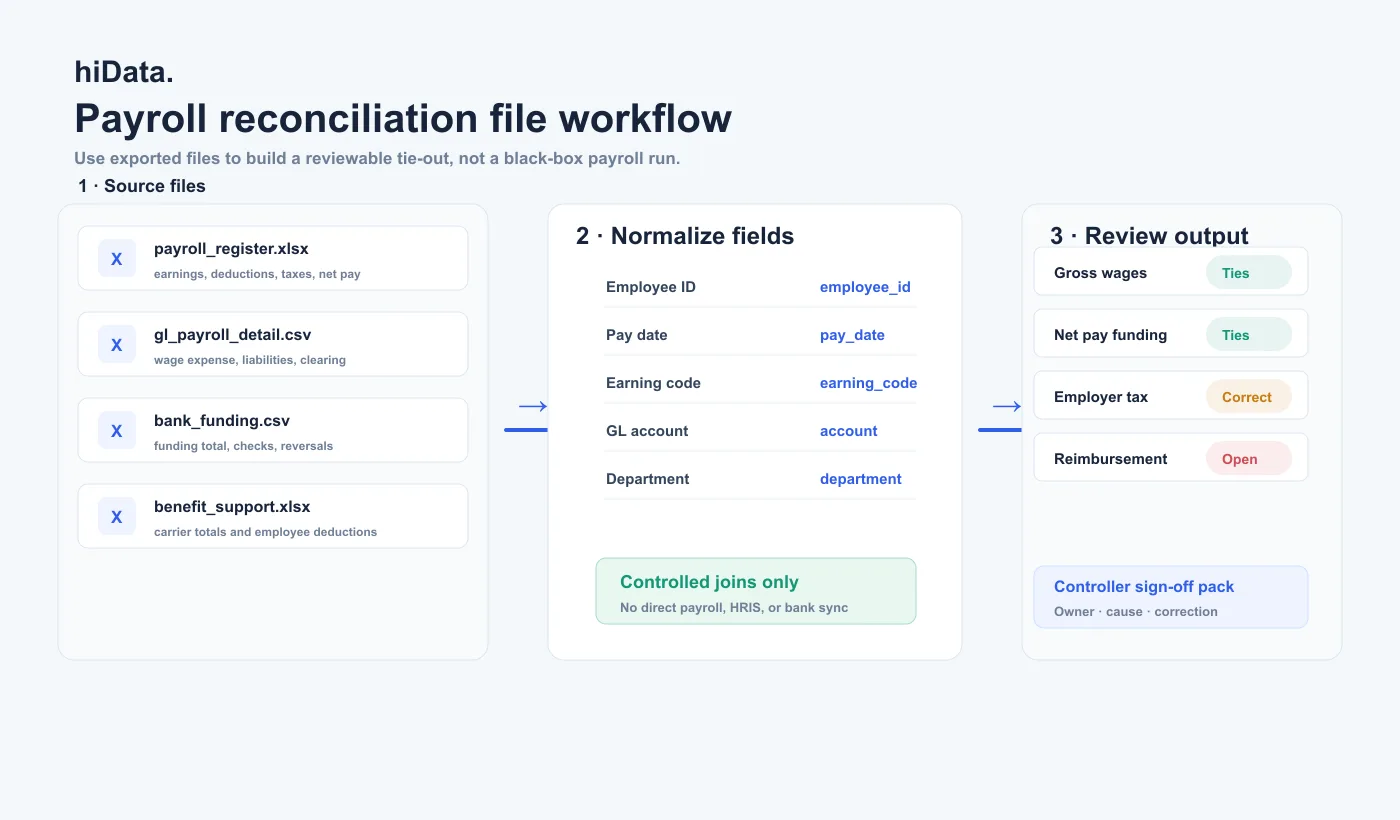
Use a controlled spreadsheet workflow:
- Export the payroll register for one pay period and pay date.
- Export GL detail for payroll-related accounts.
- Export bank or funding activity for payroll cash movements.
- Add deduction, tax, benefits, and reimbursement support.
- Standardize employee IDs, earning codes, departments, accounts, dates, and entity names.
- Separate gross pay, net pay, employer taxes, employee deductions, benefits, reimbursements, and liabilities.
- Match payroll totals to bank and GL totals.
- Identify differences by employee, department, earning code, account, and pay date.
- Build a variance register with owner, cause, correction, and sign-off status.
Keep one visible control section for payroll period, pay date, entity, currency, and source-file names. If the spreadsheet cannot prove which reports were used, the reconciliation will be hard to reproduce later.
How AI can help with payroll reconciliation spreadsheets
AI can speed up payroll reconciliation when the source files are already structured. It is useful for comparing files, grouping differences, spotting unusual changes, and drafting review summaries.
For example, hiData AI Sheets can analyze payroll exports, GL detail, bank files, deduction reports, benefit files, and variance logs provided as Excel or CSV. A finance user can ask:
- Compare payroll register totals to GL payroll accounts.
- Find employees with unusual earnings or deduction changes.
- Show department-level payroll variance from the prior period.
- Match net pay to bank funding totals.
- Identify old balances in payroll clearing accounts.
- Summarize open payroll variances by owner and due date.
- Create a month-end payroll reconciliation review table.
The boundary is important. File analysis does not process payroll, approve timesheets, submit tax filings, verify legal compliance, transmit direct deposits, or replace payroll review sign-off. Payroll, accounting, HR, and tax owners still control the source data and final decisions.
Choosing a payroll reconciliation tool
Choose the tool based on the control gap.
| Primary need | Tool type | Verify before choosing |
|---|---|---|
| Calculate payroll and employee pay | Payroll system | Earnings, deductions, taxes, approval workflow, audit reports |
| Capture time and attendance | Time-tracking system | Approved hours, overtime, PTO, pay-code mapping |
| Post payroll to accounting | Accounting or ERP system | GL account mapping, departments, entities, journal entry detail |
| Review exported files | Spreadsheet or AI spreadsheet tool | Explainable joins, editable output, variance review, repeatability |
| Manage close sign-off | Close-management workflow | Owners, due dates, evidence, review trail |
If the main issue is analyzing exported payroll and accounting files, an AI spreadsheet workflow can help. If the main issue is calculating pay, filing payroll taxes, or transmitting payments, use a payroll platform and qualified payroll support instead.
For spreadsheet-based comparisons, see this guide to AI spreadsheet tools.
Frequently asked questions
What is payroll reconciliation in simple terms?
Payroll reconciliation is the process of checking that payroll records, bank payments, taxes, deductions, and accounting entries all agree for a payroll period. It helps confirm that employees were paid correctly and payroll was posted correctly.
What is the difference between payroll reconciliation and payroll processing?
Payroll processing calculates and releases payroll. Payroll reconciliation checks whether the payroll results match supporting records, bank activity, liabilities, and the general ledger.
How do you reconcile payroll to the general ledger?
Start with the payroll register, then compare gross wages, employer taxes, employee deductions, benefits, reimbursements, net pay, and liabilities to the related GL accounts. Investigate differences by employee, earning code, department, account, and pay date.
How often should payroll be reconciled?
Payroll should be reviewed before each payroll run, after posting, during month-end close, and before quarter-end or year-end reporting. Teams with high payroll volume or frequent employee changes may need more frequent review.
What causes payroll reconciliation differences?
Common causes include duplicate payments, missing employees, terminated employees paid by mistake, incorrect department coding, deduction mismatches, tax liability differences, bank timing issues, failed payments, and old payroll clearing balances.
Can payroll reconciliation be done in Excel?
Yes. Many teams reconcile payroll in Excel or CSV exports. The spreadsheet should use consistent report dates, employee IDs, account mappings, and a clear variance register so the work can be reproduced and reviewed.
Can AI reconcile payroll?
AI can compare structured payroll, GL, bank, deduction, and benefits files to surface differences and summarize exceptions. It does not replace payroll approval, tax filing, compliance review, payment authorization, or accounting sign-off.
Sources and methodology
This guide is based on payroll operations patterns visible across current payroll reconciliation ranking pages, finance close controls, and official U.S. payroll recordkeeping concepts. It avoids legal, tax, and compliance advice. Confirm current federal, state, local, and company-specific payroll requirements before relying on any operational checklist.
Editorial references consulted for accuracy:
- IRS employment tax recordkeeping guidance
- U.S. Department of Labor FLSA recordkeeping guidance
- Search-intent review of current payroll reconciliation educational pages supplied in the brief; official legal, tax, and payroll requirements should be validated through primary sources.
Conclusion
Payroll reconciliation should make payroll explainable. A good review ties the payroll register to approved employee data, deduction support, bank payments, payroll liabilities, and the general ledger.
The best output is not a giant workbook. It is a clean variance register where every material difference is marked Clear, Correct, Reverse, Accrue, Monitor, or Escalate.