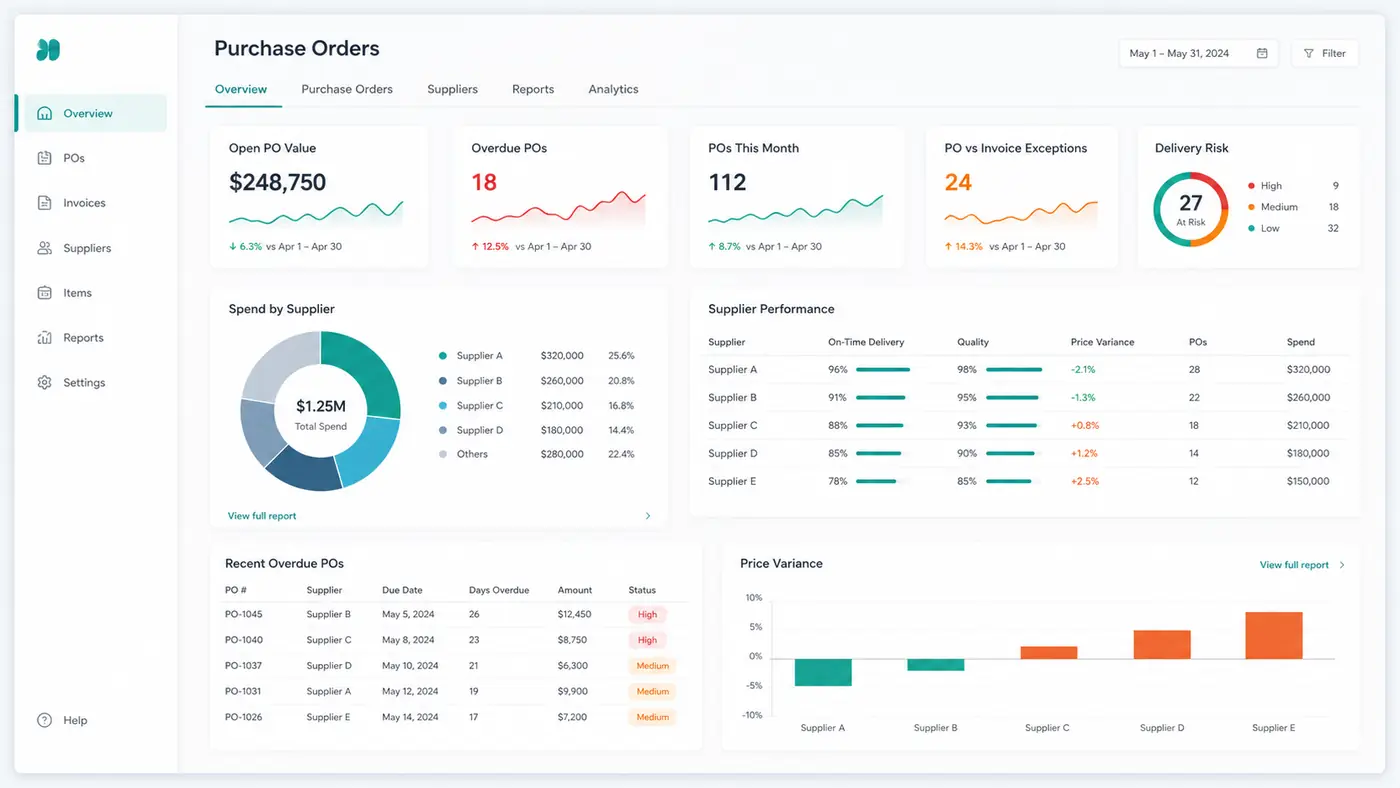
Purchase order management is the process of controlling a purchase order from an approved buying request through supplier confirmation, receipt, invoice matching, and closure. A useful process shows what was authorized, what is still open, what has arrived, what has been invoiced, and who owns each exception.
The purchase order itself is only the starting record. The real work is keeping the order connected to supplier updates, receipts, invoices, changes, and final closure. When those records sit in separate spreadsheets or exports, an open PO report can show committed cash without explaining whether the goods are late, partially received, disputed, or simply waiting to be closed.
This guide explains how to manage that lifecycle, build an open PO tracker, review exceptions, and decide when a spreadsheet workflow is sufficient and when a dedicated purchasing system is necessary.
Key takeaways
- A purchase order should have one accountable owner and one current lifecycle status.
- Track commitments at PO-line level when partial receipts, split deliveries, or price changes are possible.
- An open PO is not automatically late. Compare the expected delivery date, received quantity, invoice status, and documented holds.
- Match the purchase order, receipt, and supplier invoice before treating an invoice as ready for payment.
- Close completed, cancelled, and immaterial residual lines so open-commitment reports remain useful.
- Review exceptions and actions, not only totals. Every material overdue or mismatched line needs an owner and next review date.
Table of contents
- What is purchase order management?
- Purchase order management vs procurement
- The purchase order management process
- What a purchase order tracker should contain
- How to track purchase order status
- Open PO aging and closure
- Three-way matching example
- Weekly purchase order review
- Purchase order management best practices
- Metrics that support action
- Spreadsheet, AI analysis, or purchasing software?
- Frequently asked questions
- Sources and methodology
What is purchase order management?
Purchase order management is the operating discipline used to create, issue, track, change, receive, match, and close purchase orders. It connects a buying decision to the evidence that the supplier accepted the order, delivered the goods or services, and billed according to the agreed terms.
This is part of the wider procure-to-pay process. SAP describes that lifecycle as requisition, purchase order, fulfillment, receipt or service entry, invoice reconciliation, and payment. The specific system labels vary, but the control question stays the same: can the team trace an approved purchase through fulfillment and financial settlement?
A growing company may manage this work in an ERP, procurement platform, accounting system, or a controlled spreadsheet built from system exports. The tool matters less than the operating rules behind it. Each order needs a unique reference, reliable status, supporting documents, and a clear way to resolve exceptions.
Purchase order management vs procurement
Purchase order management and procurement overlap, but they are not identical.
| Area | Main question | Typical scope | Main output |
|---|---|---|---|
| Procurement | What should we buy, from whom, and under what commercial terms? | Sourcing, supplier selection, negotiation, policy, contracts | Approved supplier and buying decision |
| Purchase order management | What happened to the authorized order? | Issue, confirmation, change, delivery, receipt, matching, closure | Controlled PO record and exception log |
| Accounts payable | Is the supplier invoice valid and ready for payment? | Invoice capture, matching, approval evidence, payment status | Approved liability and payment instruction |
| Inventory management | What stock is available, committed, in transit, or needed? | On-hand stock, demand, replenishment, movement | Inventory position and replenishment decision |
The same transaction can appear in all four areas. A buyer negotiates with the supplier, the PO records the approved commitment, the receiving team records delivery, and accounts payable verifies the invoice. Clear handoffs prevent each team from maintaining a different version of the order.
The purchase order management process
1. Define the buying need
Record the item or service, requested quantity, required date, cost center, budget owner, and business reason. This step prevents vague requests from becoming incomplete orders.
2. Approve the purchase request
Apply the organization's approval rules before committing to the supplier. The approval record should identify the approver, date, amount, and any conditions. hiData does not replace this approval control.
3. Issue a complete purchase order
Assign a unique PO number and include the supplier, ship-to or service location, line description, quantity, price, currency, tax treatment, payment terms, and expected delivery date. Send the approved version to the supplier and retain it as the baseline.
4. Record supplier confirmation
Capture whether the supplier accepted the quantity, price, and delivery date. If the supplier proposes a different date or quantity, record the change instead of silently overwriting the original commitment. SAP's purchase order collaboration guidance treats supplier confirmation as a separate document because it shows whether the supplier can fulfill the order and where it proposes deviations.
5. Track delivery and changes
Update expected dates, shipment references, partial deliveries, cancellations, and approved change orders. Keep the original ordered quantity and price visible so later variance analysis remains possible.
6. Record the receipt or service entry
Record what was actually received, when, where, and by whom. For services, use an approved service entry or equivalent evidence. Do not mark an order fully received because an invoice arrived.
7. Match the invoice
Compare the invoice with the approved PO and, when required, the receipt. Check supplier, item, quantity, unit price, taxes, freight, currency, and terms. Separate acceptable tolerances from exceptions that require review.
8. Resolve exceptions and close the order
Assign mismatches, overdue deliveries, damaged goods, missing receipts, and disputed invoices to an owner. Close the PO only when the remaining delivery and invoicing obligations are complete, cancelled, or formally waived under policy.
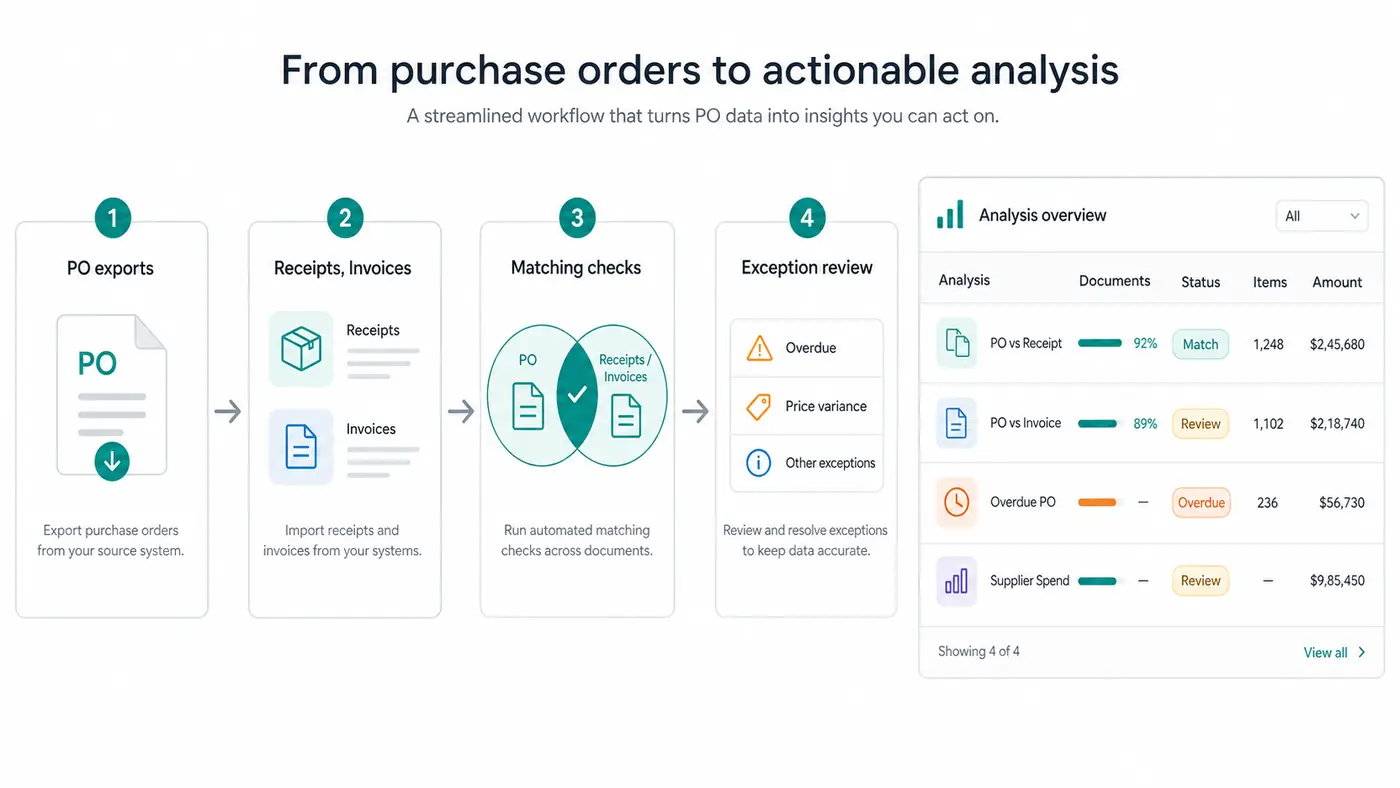
A complete PO process preserves the connection between the approved order, supplier response, receipt, invoice, and final close decision.
What a purchase order tracker should contain
A useful tracker keeps source facts separate from calculated status and human actions. When one PO contains several products, delivery dates, or receipts, use one row per PO line rather than one row per PO header.
Source fields
- PO number and line number
- Supplier ID and supplier name
- Requester, buyer, cost center, and entity
- Item, SKU, or service description
- Order date and expected delivery date
- Ordered quantity, unit price, currency, and PO value
- Confirmed delivery date, if different
- Received quantity and latest receipt date
- Invoiced quantity and invoice amount
- Hold, dispute, cancellation, or change-order status
Calculated fields
- Remaining quantity
- Open PO value
- Days overdue
- Current lifecycle status
- Receipt variance
- Invoice price or quantity variance
- Exception type and priority
Action fields
- Owner
- Next action
- Due date
- Last supplier contact
- Review note
- Closure decision and closure date
Download the free purchase order tracker. The workbook includes editable sample rows, formula-driven open values and overdue days, and a summary of open, overdue, partially received, and mismatched orders.
How to track purchase order status
Avoid a single status field that tries to describe approvals, delivery, invoicing, and exceptions at once. A PO can be approved, partially received, partly invoiced, and on hold at the same time. Keep source statuses separately when possible, then calculate one review status for operational follow-up.
| Review status | Use when | Required next step |
|---|---|---|
| Awaiting confirmation | The PO was issued but the supplier has not confirmed it | Obtain confirmation or escalate before the required date is at risk |
| Confirmed | Supplier terms and expected delivery are recorded; nothing is yet due | Monitor the confirmed delivery date |
| Overdue | Open quantity remains after the expected delivery date | Confirm revised date, cancellation, or escalation |
| Partially received | Some, but not all, ordered quantity has been received | Track the remaining quantity and expected delivery |
| Received, not invoiced | Receipt is complete but invoice is not recorded | Confirm whether an invoice is expected and preserve accrual evidence |
| Invoice mismatch | Invoice quantity, price, or charges do not meet the matching rule | Assign the variance to buyer, receiver, supplier, or AP |
| On hold | A documented issue temporarily blocks further processing | Record reason, owner, and review date |
| Closed | No further receipt or invoice activity is expected | Retain the close reason and supporting evidence |
| Cancelled | The remaining order will not be fulfilled | Reverse or release the remaining commitment under policy |
Oracle distinguishes Open, On Hold, Closed for Receiving, Closed for Invoicing, Closed, and Finally Closed. Your spreadsheet does not need to copy those labels, but it should preserve the same distinctions: delivery complete does not always mean invoicing complete, and neither automatically means the order can disappear from review.
Open PO aging and closure
An open PO report answers more than "how much is open?" It should show why each amount remains open.
Calculate open quantity as ordered quantity minus accepted received quantity, after approved cancellations. Calculate open PO value using the remaining quantity and approved unit price, with separate treatment for service or amount-based orders. Do not subtract invoices from ordered quantity unless the organization's policy explicitly defines commitment that way.
For delivery aging, compare the current review date with the latest approved expected delivery date. A confirmed future order is open but not overdue. A partially received order may have both a valid received amount and an overdue remaining amount.
Review these closure questions:
- Has the expected quantity or service been received and accepted?
- Is any remaining quantity still expected?
- Have all expected invoices been received or accrued?
- Are price, quantity, freight, tax, or currency exceptions resolved?
- Is the residual amount material under company policy?
- Was a cancellation or change approved and documented?
Oracle documents receipt and invoice close controls separately. This matters because closing an order too early can hide an expected receipt or invoice, while leaving completed orders open overstates outstanding commitments.
Three-way matching example
Assume PO PO-1048 authorizes 100 units at $12 each. The warehouse records 80 units received. The supplier invoice requests payment for 100 units at $13.50.
| Comparison | PO | Receipt | Invoice | Result |
|---|---|---|---|---|
| Quantity | 100 | 80 | 100 | Invoice exceeds received quantity by 20 units |
| Unit price | $12.00 | n.a. | $13.50 | Invoice price exceeds PO price by $1.50 per unit |
| Value represented | $1,200 | $960 at PO price | $1,350 | Do not treat the invoice as fully matched |
The next action is not automatically "reject invoice." First determine whether the receipt is late, the supplier shipped in parts, an approved change order is missing, or the invoice is incorrect. Assign the quantity issue to receiving or the buyer and the price issue to the buyer or supplier. Keep the invoice out of the payment-ready group until the required evidence and approvals exist.
Microsoft’s three-way matching guidance separates product-receipt quantity matching from price matching and allows organizations to define tolerances. The example above deliberately uses no assumed tolerance. Apply only the tolerance approved by your organization and keep overrides visible.
After the PO and receipt are compared, the related invoice moves into a different control queue. See the invoice processing guide for invoice capture, approval, exception aging, and payment-readiness checks. Once approved invoices remain unpaid, an AP aging report helps prioritize them by due-date bucket.
Weekly purchase order review
A weekly review should produce an action register, not another passive dashboard.
- Confirm data coverage. Check the export date, entities, currencies, cancelled orders, and whether all PO lines are included.
- Reconcile the open total. Compare the tracker with the source system's open PO total and explain differences.
- Review unconfirmed orders. Prioritize orders near their required date or with high operational impact.
- Review overdue and partial receipts. Sort by days overdue, open value, and item criticality.
- Review matching exceptions. Separate receipt gaps, quantity variance, price variance, duplicate invoices, and missing references.
- Review stale residuals. Identify small balances and old lines that need closure, cancellation, or correction.
- Assign actions. Give every material exception an owner, due date, and next step.
- Lock the period record. Save the reviewed version so the team can reproduce changes and measure resolution time.
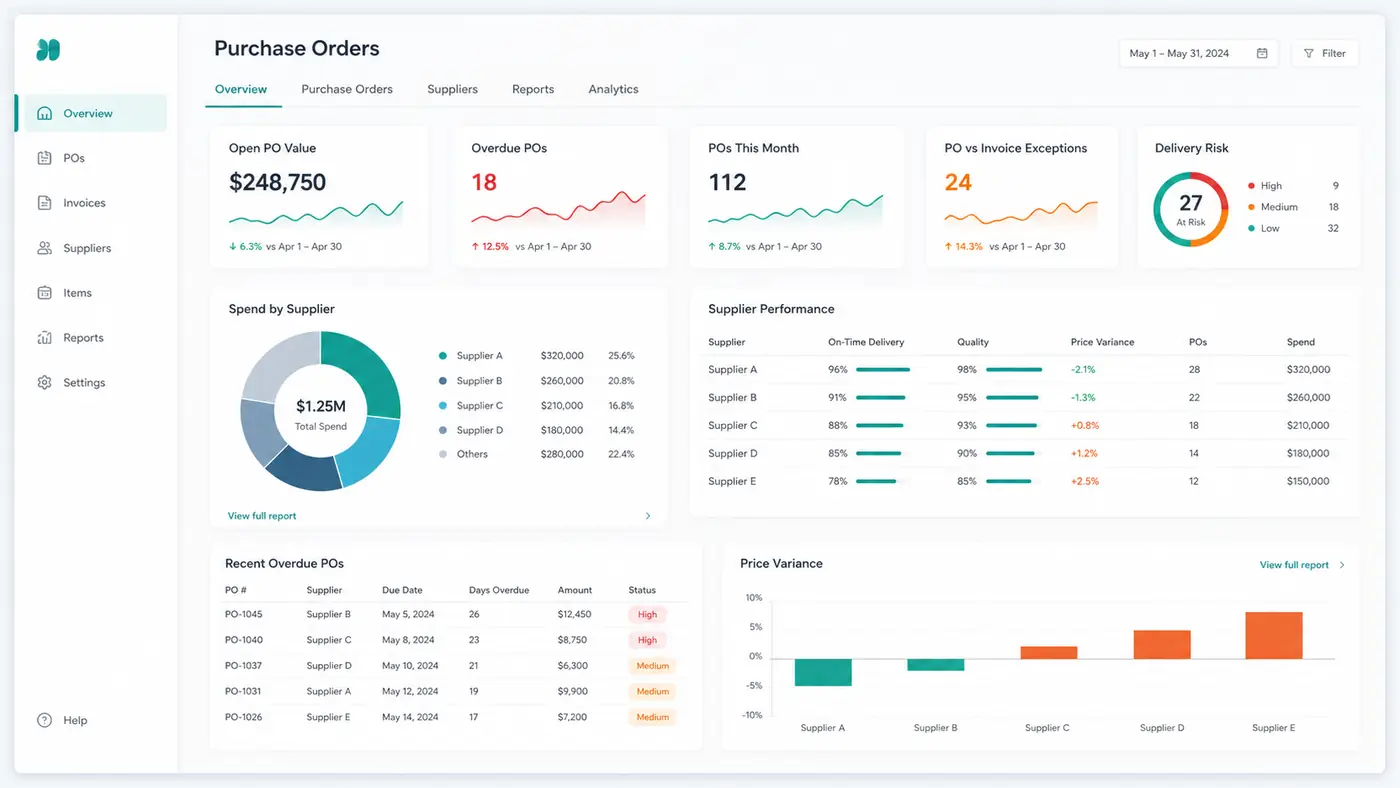
The useful output is a short exception queue with owners and deadlines, supported by traceable PO-line detail.
Purchase order management best practices
Keep the original commitment visible
Store approved changes as changes. Do not overwrite the original price, quantity, or delivery date without history. Otherwise, the final file cannot explain supplier variance or internal scope changes.
Track at the level where exceptions occur
Header-level totals are useful for summaries, but receipts and invoices usually differ at line level. Track PO lines when an order can be delivered or invoiced in parts.
Separate dates by meaning
Order date, required date, supplier-confirmed date, shipment date, receipt date, and invoice date answer different questions. One generic "date" column creates false overdue flags.
Standardize supplier and item identifiers
Supplier aliases and inconsistent SKU descriptions make duplicate detection and supplier analysis unreliable. Preserve the source text, but map it to an approved supplier ID and item ID.
Define tolerance and escalation rules
Document which quantity or price differences can pass, who can approve an exception, and when an overdue delivery must be escalated. Do not let each reviewer invent a tolerance during invoice review.
Close deliberately
Use a documented closure reason such as completed, cancelled remainder, replaced by change order, or immaterial residual approved for closure. A blank status is not a close decision.
Metrics that support action
| Metric | Calculation | Decision it supports |
|---|---|---|
| Open PO value | Sum of valid remaining commitments | Near-term purchasing and cash review |
| Overdue open value | Open value for lines past the approved expected date | Supplier follow-up and escalation |
| Unconfirmed PO count | Issued POs without supplier confirmation | Confirmation backlog |
| Partial receipt rate | Partially received lines divided by received or open lines | Delivery reliability review |
| Match exception value | Invoice value currently blocked by quantity or price mismatch | AP and procurement workload |
| Stale PO count | Open lines older than the organization's review threshold | Closure and data-quality cleanup |
| On-time receipt rate | Lines received on or before the approved expected date | Supplier performance review |
Define the denominator, date basis, currency, and materiality threshold before comparing periods. A lower open PO value is not automatically better; it may reflect completed deliveries, cancelled purchases, missing data, or premature closure.
For a repeatable supplier-level view, use the supplier scorecard template to calculate on-time delivery, quality acceptance, price compliance, and a weighted score from completed PO-line records.
Spreadsheet, AI analysis, or purchasing software?
Use the system that matches the missing control.
- Use an ERP or procurement platform when the business needs official PO creation, approval routing, budget enforcement, supplier portals, system-of-record status, change orders, and integrated receiving.
- Use an AP automation platform when invoice intake, matching workflow, approval evidence, and payment readiness are the main problems.
- Use a controlled spreadsheet when volume is manageable, source exports are reliable, and a named owner can maintain the tracker and review exceptions.
- Use an AI spreadsheet analysis layer when the files already exist but require cleaning, joining, grouping, exception detection, charts, or written summaries.
With hiData AI Sheets, a team can upload exported PO, receipt, invoice, supplier, and inventory files and ask questions such as:
- Which open PO lines are overdue, and who owns them?
- Which invoices exceed received quantity or approved unit price?
- Which suppliers have the largest overdue open value?
- Which completed lines remain open and may need closure review?
- What changed in open commitments since last week's export?
The output can be an exception table, supplier summary, chart, or review memo. hiData does not issue purchase orders, route approvals, update the ERP, verify delivery, approve invoices, or release payments. Reviewers remain responsible for source records, policy, tolerances, and decisions.
Frequently asked questions
What is purchase order management in simple terms?
Purchase order management is the process of keeping an approved order accurate and traceable from issue through supplier confirmation, delivery, invoice matching, and closure. It shows what was ordered, what remains open, and which exceptions need action.
How do you manage purchase orders effectively?
Use unique PO numbers, complete line-level data, defined statuses, supplier confirmation, accurate receipts, invoice matching, and documented closure rules. Review open and overdue lines regularly and assign every material exception to an owner.
How do you track open purchase orders?
Track ordered quantity and value, received quantity, invoiced quantity, expected delivery date, confirmation status, exception type, owner, and next action. Calculate remaining quantity, open value, and days overdue from consistent source exports.
What is the difference between a purchase requisition and a purchase order?
A purchase requisition is an internal request to buy goods or services. A purchase order is the approved order sent to a supplier and records the commercial commitment.
What is three-way matching?
Three-way matching compares a supplier invoice with the purchase order and the receipt or service entry. It checks whether the billed quantity and price agree with what was authorized and received, subject to approved tolerance rules.
When should a purchase order be closed?
Close a PO when no further receipt or invoice activity is expected and all material differences are resolved, cancelled, or formally waived. Keep the closure reason and evidence so the remaining commitment does not disappear without explanation.
Can purchase orders be managed in Excel?
Yes, for manageable volumes and file-based workflows. The tracker needs controlled fields, consistent updates, formula checks, an owner, and reconciliation to the source system. Formal approvals and system-of-record changes should remain in the authorized purchasing or accounting system.
What should purchase order management software include?
Depending on the organization's needs, useful capabilities include requisition and approval controls, PO creation, supplier communication, receiving, change history, invoice matching, exception ownership, reporting, integrations, access controls, and audit history.
Sources and methodology
This guide describes a general PO control workflow. Organizations should apply their own purchasing policy, approval thresholds, accounting treatment, matching tolerances, and system controls.
Primary product documentation consulted:
- SAP: Define the Purchase Order Lifecycle
- SAP: Purchase Order Collaboration document flow
- Microsoft: Three-way matching policies
- Oracle: Purchase order statuses
- Oracle: What happens if a purchase order is closed?
Conclusion
Purchase order management works when every material order can be traced from approval to its current delivery, invoice, exception, and closure status. The objective is not to maintain the largest report. It is to keep commitments accurate and make the next action obvious.
Start with reliable PO-line data, supplier confirmations, receipts, invoice comparisons, and closure rules. Then use a weekly exception review to resolve overdue deliveries, partial receipts, mismatches, and stale balances before they distort cash, inventory, or supplier decisions.
If your team already works from exported spreadsheets, review your open purchase orders with hiData and turn the files into a focused exception list for human review.