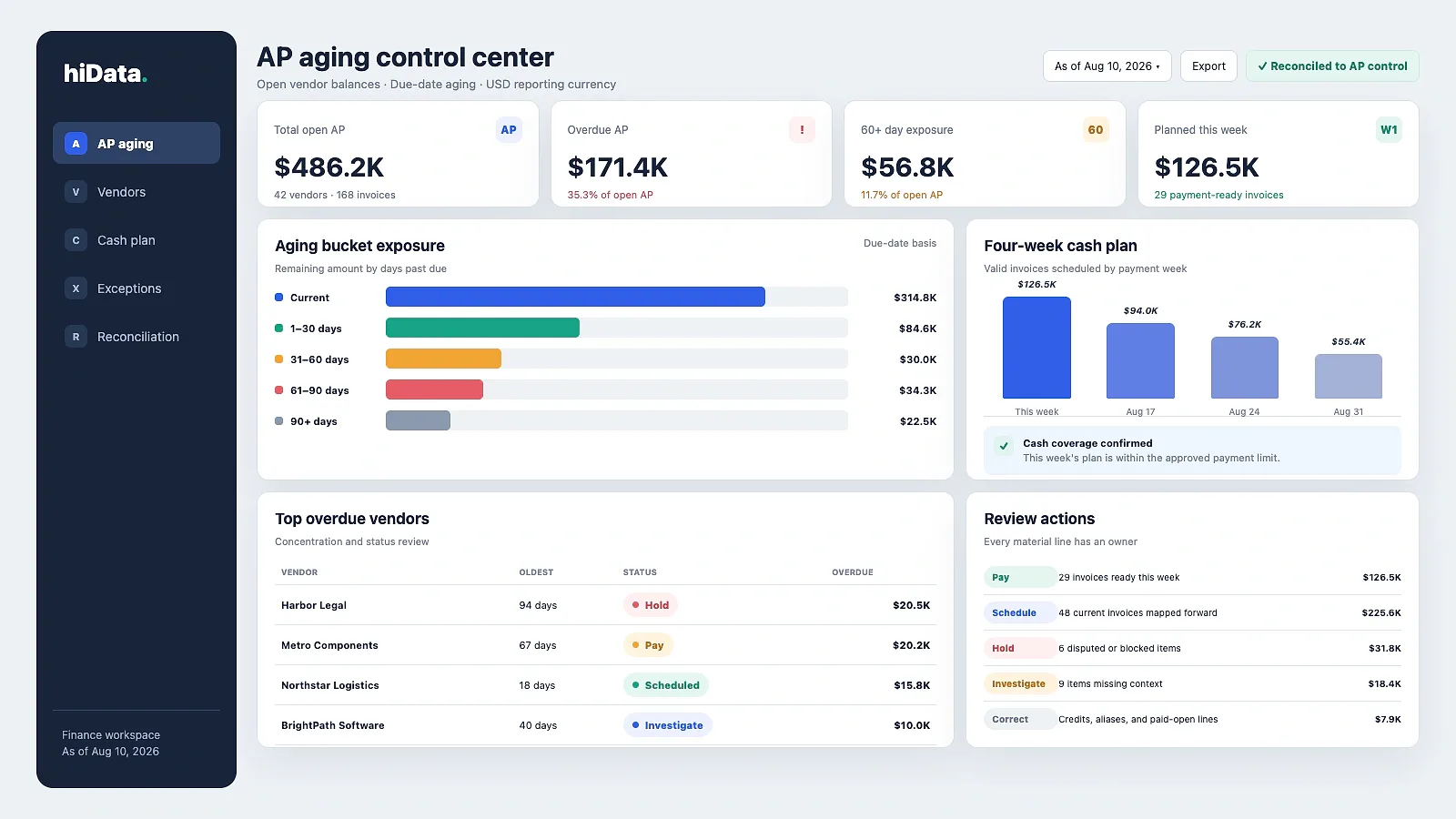
An AP aging report is a point-in-time list of unpaid vendor invoices grouped by how long they are overdue. It normally uses Current, 1-30, 31-60, 61-90, and 90+ day buckets so finance teams can see what is due, investigate old or unusual balances, and plan payments without treating every overdue invoice the same way.
At 8:40 a.m., two days before a vendor payment run, a controller sees $486,200 of open AP. One balance is current, another is 47 days overdue, a third is negative because a credit memo is unapplied, and two invoices are disputed. The total is correct, but it is not yet a payment decision. A useful aging report adds the context needed to separate items that should be paid, scheduled, held, investigated, or corrected.
When the team needs a management view rather than only aging buckets, an accounts payable dashboard in Excel can add vendor concentration, KPIs, and a reviewable payment-priority queue while preserving the invoice-level detail.
AP aging report in 30 seconds
- Purpose: show open accounts payable as of one fixed reporting date.
- Preferred basis for overdue analysis: due date, because it reflects the agreed payment terms.
- Common buckets: Current, 1-30, 31-60, 61-90, and 90+ days past due.
- Essential control: reconcile invoice-level aging to the AP subledger and general-ledger control account.
- Useful output: a payment and exception plan, not only a liability total.
- Download: use the free AP aging Excel template to test the workflow with your own exported data.
What is an AP aging report?
An accounts payable aging report organizes unpaid supplier invoices into time bands according to an as-of date. A detailed report normally shows each vendor, invoice, due date, original amount, remaining amount, days past due, and aging bucket. A summary report rolls those lines up by vendor or bucket.
In simple terms, it answers three questions:
- Who does the business owe?
- How much remains unpaid as of the report date?
- Is each balance current, overdue, disputed, credited, or otherwise blocked?
Official ERP documentation follows the same basic pattern. Oracle describes its A/P Aging report as a view of all unpaid bills, while Microsoft allows vendor balances to be aged by transaction date, due date, or document date. The calculation method therefore matters as much as the labels shown in the report.
An AP aging report is not the same as a payment run. Aging describes exposure and timing. Payment execution still requires validated bank details, approval evidence, payment controls, and an authorized release process.
AP aging report vs invoice processing vs AR aging
These reports and workflows touch the same invoices, but they answer different operating questions.
| Area | Main question | Unit of analysis | Typical action |
|---|---|---|---|
| AP aging report | What do we owe as of this date, and how overdue is it? | Open vendor balance or invoice | Pay, schedule, hold, investigate, or correct |
| Invoice processing | Is this invoice valid, coded, matched, approved, and ready to pay? | Individual invoice through workflow stages | Capture, validate, match, approve, and release |
| AR aging report | What do customers owe us, and how late are they? | Open customer balance or invoice | Collect, contact, dispute, or write off |
AP aging is a point-in-time liability view. The invoice processing workflow explains how an invoice reaches that open-payables position. AR aging looks in the opposite cash direction — toward expected collections rather than vendor payments.
What should an AP aging report include?
A useful report needs enough detail to explain both the balance and the action.
| Field | Why it matters | Review check |
|---|---|---|
| As-of date | Defines the point in time represented by the report | Confirm every reviewer is using the same date |
| Vendor name and ID | Groups exposure and links to vendor master data | Merge aliases; keep separate legal entities separate |
| Invoice number | Identifies the payable item | Test duplicates within each vendor |
| Invoice and posting dates | Support cut-off and source-record review | Check future-dated or backdated entries |
| Due date and payment terms | Determine overdue status | Recalculate due date from approved terms |
| Original amount | Shows the starting liability | Confirm currency and tax treatment |
| Applied payments | Reduces the open balance | Match partial payments to the correct invoice |
| Applied credits | Reduces the amount payable | Identify unapplied or unrefunded credits |
| Open amount | Shows the remaining liability | Recalculate from source transactions |
| Hold or dispute status | Explains why an overdue item may not be payable | Require an owner, reason, and review date |
| PO, contract, or receipt reference | Supports the invoice's validity | Trace unresolved matching issues |
| Currency and entity | Prevent misleading consolidated totals | Separate transaction and reporting currencies |
Keep invoice-level detail until exceptions have been tested. Vendor totals help with cash planning and concentration analysis, but one net vendor balance can hide a current invoice, an old credit, and a disputed item.
How AP aging buckets work
The report needs three inputs: the as-of date, the aging basis, and the bucket ranges.
For a due-date aging report, days past due should be calculated from the fixed as-of date and the invoice due date. The amount in each bucket should use the remaining open balance after valid payments, credits, discounts, retainage, and adjustments are applied.
| Aging bucket | Rule | Review meaning |
|---|---|---|
| Current | Due date is on or after the as-of date | Not yet overdue; include in forward cash planning |
| 1–30 days | 1 to 30 days past due | Recently overdue; confirm payment or hold status |
| 31–60 days | 31 to 60 days past due | Owner follow-up and vendor communication needed |
| 61–90 days | 61 to 90 days past due | Material overdue exposure; escalate valid balances |
| 90+ days | More than 90 days past due | Investigate dispute, duplicate, credit, payment application, or long-running cash issue |
The familiar 30-day bands are common, not mandatory. SAP and Microsoft documentation both describe configurable aging intervals. Whatever ranges the business chooses, document them and use them consistently so month-to-month movement remains comparable.
Should AP aging use the due date or invoice date?
Use the due date when the question is, "How overdue is this invoice under its agreed payment terms?" A Net 60 invoice and a Net 15 invoice issued on the same day should not become overdue together.
Some systems also support aging by invoice date or posting date. That can be useful for document-age analysis, operational backlog, or a specific accounting policy - but it answers a different question. The report title and methodology should state the aging basis clearly. For overdue analysis, due-date aging is usually more useful because invoice-date aging can make longer-term invoices look late before they are actually due.
How to reconcile an AP aging report before using it
Do not prioritize payments from an unreconciled aging report. A clean-looking dashboard can still carry the wrong control total.
1. Freeze the as-of date
Run every source report for the same cut-off. A historical aging should not include transactions posted after that date unless the reporting method explicitly reconstructs historical open items.
2. Reconcile the control total
Compare the invoice-level aging total with the AP subledger or trial balance and the AP general-ledger control account. Differences often come from unposted transactions, direct journal entries to the control account, timing cut-offs, foreign-currency treatment, or payments applied after the report date.
3. Recalculate open amounts
Verify partial payments, credit memos, discounts, retainage, and adjustments. A paid invoice left open overstates the liability. An unapplied credit can create a negative vendor balance or make old invoices appear larger than the amount actually payable.
4. Validate terms and due dates
Incorrect terms push invoices into the wrong bucket. Review overrides, missing due dates, and vendors whose master-data terms do not match the contract.
5. Separate exceptions from payable items
Label disputes, holds, duplicate risk, missing receipts, and approval gaps. "90+ days" is not a payment instruction — it is an age signal that still needs context.
The useful operating pattern is consistent: use the aging report to identify errors, prioritize available cash, and reconcile vendor balances with source records or the general ledger. Validate the report first, then schedule cash.
AP aging report example and free template
Assume the report is run on August 10, 2026.
| Vendor | Invoice # | Due Date | Days Past Due | Aging Bucket | Amount Due | Payment Priority | Notes |
|---|---|---|---|---|---|---|---|
| Northstar Logistics | NL-8041 | Aug 5 | 5 | 1-30 | $7,900 | Pay now | Valid invoice; critical carrier |
| BrightPath Software | BP-2218 | Jul 1 | 40 | 31-60 | $4,800 | Hold | Renewal scope unclear; contract owner to confirm |
| Metro Components | MC-1187 | Jun 4 | 67 | 61-90 | $6,450 | Escalate | Production supplier; schedule payment after approval |
| Apex Office | CM-308 | — | — | Credit | -$950 | Correct | Unapplied credit memo should be matched first |
| Harbor Legal | HL-990 | May 8 | 94 | 90+ | $12,500 | Investigate | Fee dispute documented; keep resolution date visible |
| Vector Office | VO-4412 | Aug 24 | 0 | Current | $3,120 | Schedule | Approved invoice; plan for a future payment run |
This example turns one total into six different decisions. Paying every overdue line would release cash against a disputed invoice and ignore an available credit. Paying nothing would put a critical supplier at risk. The value of an AP aging report is the separation.
Download the free AP aging Excel template
The workbook includes an editable invoice-detail sheet and an automatically calculated summary. Change the as-of date, replace the sample rows, and review the calculated open amount, days past due, aging bucket, and recommended action. Before using the result for payment planning, reconcile it to the AP subledger and general ledger.
Turn the aging report into a weekly payment review
A strong weekly review should produce a short action register rather than another static PDF.
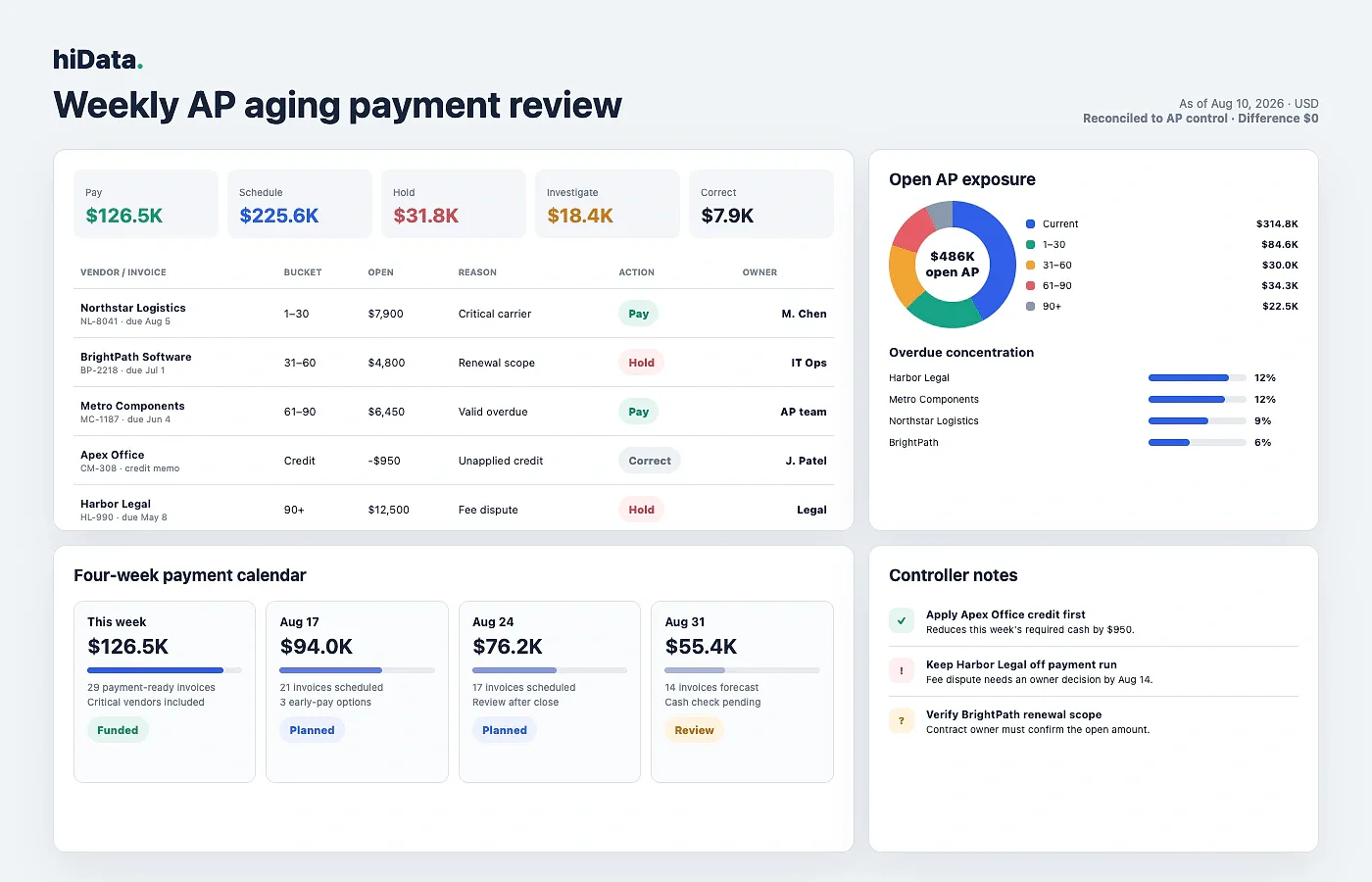
- Pay now: a valid overdue invoice with supplier, late-fee, or service-continuity risk. Record the proposed payment batch and approver.
- Schedule: a valid current invoice due before a future payment run. Record the payment week and expected cash requirement.
- Hold: an invoice blocked by a dispute, mismatch, missing receipt, or control issue. Record the reason, owner, and next review date.
- Investigate: an old or unusual balance without enough evidence. Assign a named owner and deadline.
- Correct: a duplicate, paid-but-open item, wrong term, vendor alias, or unapplied credit. Fix the source record and rerun the aging.
Use this review sequence:
- Confirm the reconciled open-AP total.
- Compare current, overdue, 60+, and 90+ exposure with the prior period.
- Rank vendors by overdue amount and operational importance.
- Remove holds, disputes, and correction items from the payment-ready view.
- Apply available credits before requesting new cash.
- Map valid invoices to the next payment dates.
- Compare the resulting weekly cash requirement with available liquidity.
- Publish owners and deadlines for every exception left behind.
The review should preserve two views: gross exposure by invoice and net cash planned by payment week. Netting everything too early makes reconciliation harder; keeping only gross aging makes cash planning harder.
AP aging metrics worth monitoring
No universal benchmark works for every industry, vendor mix, or payment policy. Track movement against your own prior periods and investigate the invoice detail behind each change.
Overdue AP ratio
Divide overdue open AP by total open AP. A rise can indicate payment delays, unresolved holds, cash pressure, or incorrect payment terms.
60+ day exposure
Add the balances in the 61-90 and 90+ buckets. Persistent growth often points to disputes, unmatched invoices, posting errors, or long-running supplier issues.
Vendor concentration
Divide open AP for the largest vendors by total open AP. High concentration can change payment priority because one delayed critical supplier may create operational risk.
Credit and hold aging
Track available credits that have not been applied and the number of days each hold remains unresolved. Both expose cash leakage and exception-management backlog.
Treat these measures as diagnostic signals, not performance scores. One disputed legal invoice can materially raise the overdue ratio without indicating broad cash stress.
Common AP aging problems to investigate
Duplicate or paid-but-open invoices
Compare normalized vendor IDs, invoice numbers, dates, and amounts. A duplicate overstates AP and creates payment risk; a payment that has not been applied leaves a settled invoice in the aging report.
Unapplied credits and negative balances
A negative vendor balance can represent an unused credit memo, overpayment, or adjustment. Match the credit to eligible invoices or confirm whether the vendor should refund it before releasing more cash.
Incorrect terms or due dates
An invoice with the wrong payment terms moves into the wrong aging bucket and creates false urgency. Compare due dates with approved vendor terms and contract evidence.
Partial-payment errors
Rebuild the remaining balance from the original amount, valid payment applications, credits, discounts, and adjustments. Do not assume the exported open amount is correct.
Vendor aliases and currency mismatches
Map each vendor ID to the approved legal name, and separate transaction currency from reporting currency. Otherwise, supplier concentration and consolidated totals may be misleading.
Holds and disputes without owners
An old note is not an action plan. Every material hold or dispute needs a reason, accountable owner, next step, and review date.
How to create an AP aging report from spreadsheets
Many teams export open invoices from an ERP or accounting system and finish the review in Excel or CSV. The calculation is simple; the control discipline is not.
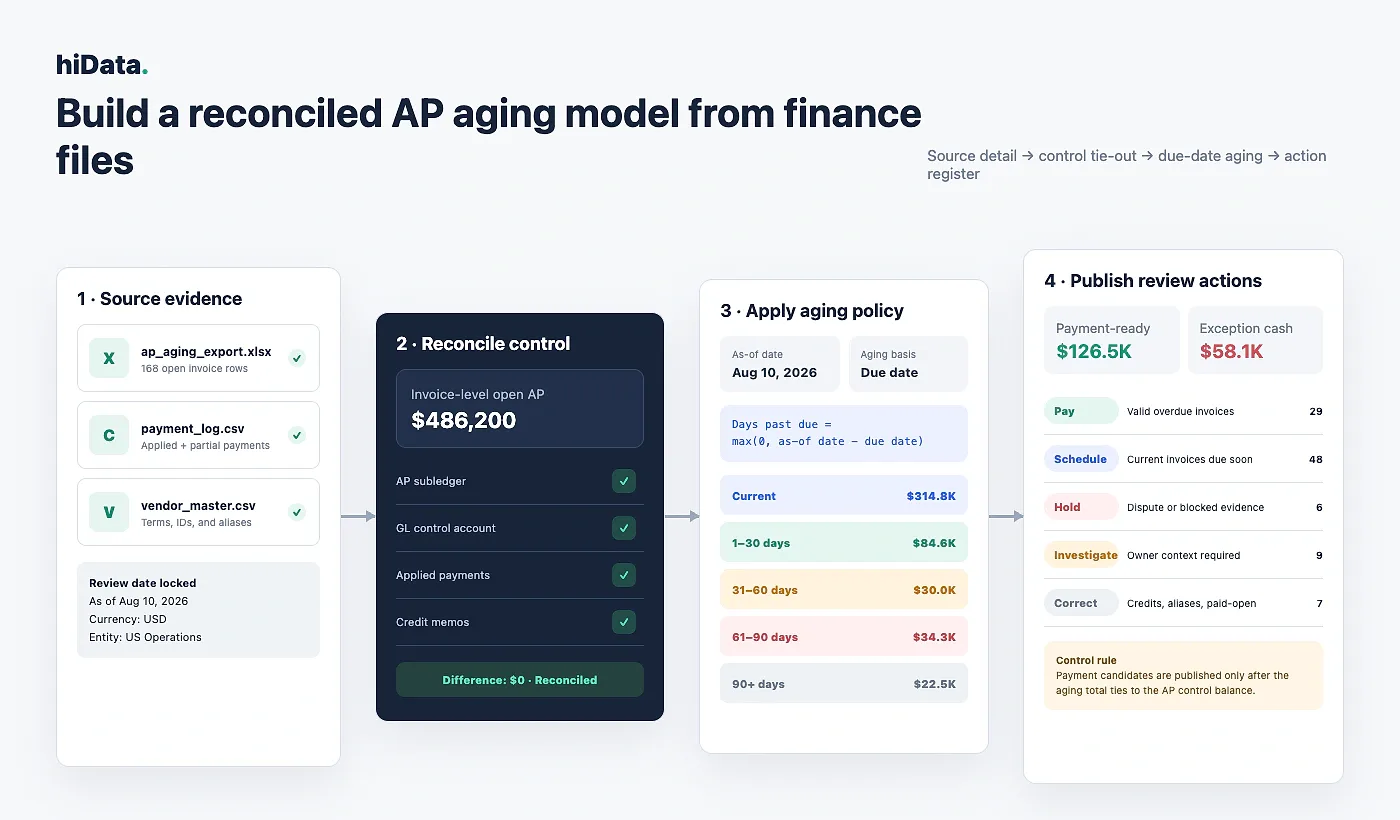
- Export invoice-level open AP for one as-of date.
- Add payment applications, credit memos, and vendor master data.
- Standardize vendor IDs, names, dates, currencies, and status labels.
- Recalculate each open amount.
- Calculate days past due from the chosen aging basis.
- Assign one bucket to each open invoice.
- Reconcile the total to the AP control balance.
- Add action, owner, payment week, and exception notes.
- Summarize by vendor, bucket, entity, and planned cash date.
- Save a locked period copy so the report can be reproduced later.
Keep the as-of date in one visible control cell and calculate days past due from that fixed date. Avoid hard-coding TODAY() into every row: it changes prior-period results when the file is reopened and makes the report difficult to reproduce.
How AI can help with AP aging spreadsheets
AI can speed up review when the source data already exists in structured files. It is most useful for comparing fields, grouping invoices, finding patterns, and drafting a review summary.
If your AP data already lives in exported Excel or CSV files, hiData AI Sheets can help clean the file, group invoices into aging buckets, flag unusual balances, and generate a payment-review table. It does not replace your accounting system or approval controls, but it can reduce the manual spreadsheet work before review.
A finance user can ask:
- Recalculate open balances using applied payments and credits.
- Find vendor aliases and possible duplicate invoice keys.
- Show vendors with the largest 60+ day exposure.
- Separate payment-ready invoices from holds and correction items.
- Build a four-week payment cash plan.
- Compare this month's aging buckets with last month's file.
- Draft an owner action list for unresolved 90+ day balances.
The boundary matters. File analysis does not approve an invoice, verify bank details, post an accounting correction, or release a payment. A finance reviewer still owns the source data, policy, judgment, and authorization.
Choosing an AP aging reporting tool
Choose the tool according to the missing control, not the appearance of its dashboard.
- Use the accounting system or ERP when you need the official as-of aging from posted accounting records. Verify date basis, credits, currency, and invoice-level drill-down.
- Use an AP automation platform when the problem is invoice intake, matching, approval evidence, or exception ownership.
- Use a payment platform when the problem is authorization, bank controls, payment status, or execution.
- Use a spreadsheet or AI spreadsheet tool when the source files already exist and the work involves cleaning, grouping, comparing, and reviewing exported data.
- Use a reconciliation workflow when month-end subledger-to-GL tie-out, sign-off, and correction tracking are the primary requirements.
For spreadsheet-analysis products, see this comparison of AI spreadsheet tools. For invoice intake through approval, review the invoice processing workflow.
Frequently asked questions
What is an AP aging report in simple terms?
An AP aging report lists unpaid vendor balances as of a specific date and groups them by how overdue they are. It helps finance decide what to pay, schedule, hold, investigate, or correct.
What is included in an AP aging report?
A useful AP aging report includes vendor name, vendor ID, invoice number, due date, payment terms, original amount, applied payments, applied credits, open amount, days past due, aging bucket, hold status, currency, and notes for disputed or unusual balances.
How do you calculate AP aging?
Choose one as-of date, subtract each invoice due date from that as-of date, calculate the remaining open amount after valid payments and credits, then assign the invoice to the correct aging bucket. Use due date aging for overdue status unless your accounting policy says otherwise.
What are the standard AP aging buckets?
The common buckets are Current, 1–30, 31–60, 61–90, and 90+ days past due. Companies may use different intervals, but the ranges and aging basis should stay consistent across reporting periods.
Should an AP aging report use invoice date or due date?
Use due date when measuring overdue status under agreed payment terms. Invoice-date or posting-date aging can support document-age or backlog analysis, but the report should label that methodology clearly.
What is the difference between AP aging and AR aging?
AP aging tracks unpaid vendor invoices the company owes to suppliers. AR aging tracks unpaid customer invoices that customers owe to the company. AP aging supports payment planning and payables control; AR aging supports collections and cash-in forecasting.
How can you create an AP aging report from Excel?
Export open invoices, payment applications, credit memos, and vendor master data into Excel or CSV. Standardize vendor names and dates, calculate days past due from a fixed as-of date, assign aging buckets, reconcile the total to the AP control balance, then add action owners for pay, schedule, hold, investigate, or correct.
Why does an AP aging report not match the general ledger?
Common causes include different as-of dates, unposted items, direct entries to the AP control account, future-dated transactions, incorrect payment applications, currency treatment, or cut-off differences. Reconcile the invoice-level detail before using the report for decisions.
Sources and methodology
This guide uses a due-date aging approach for overdue status and treats the report as a point-in-time open-payables control. Product capabilities and reporting options vary, so confirm the accounting policy and source-system settings used by your organization.
Primary references consulted for report behavior and field definitions:
- Microsoft Dynamics 365 Vendor aging report
- Microsoft Business Central accounts payable analytics
- Oracle NetSuite A/P Aging Summary Report
- SAP Aging Report - Accounts Payable
These sources describe product behavior, not a universal accounting policy. Confirm your organization's reporting basis, cut-off rules, currency treatment, and approval controls.
Conclusion
An AP aging report should do more than total unpaid bills. It should establish a reliable as-of balance, explain where that balance sits in time, and separate payable cash from holds, credits, disputes, and corrections.
The best weekly review has a clear end state: every material line is assigned to Pay, Schedule, Hold, Investigate, or Correct, and valid payments are mapped to an approved, fundable cash plan.