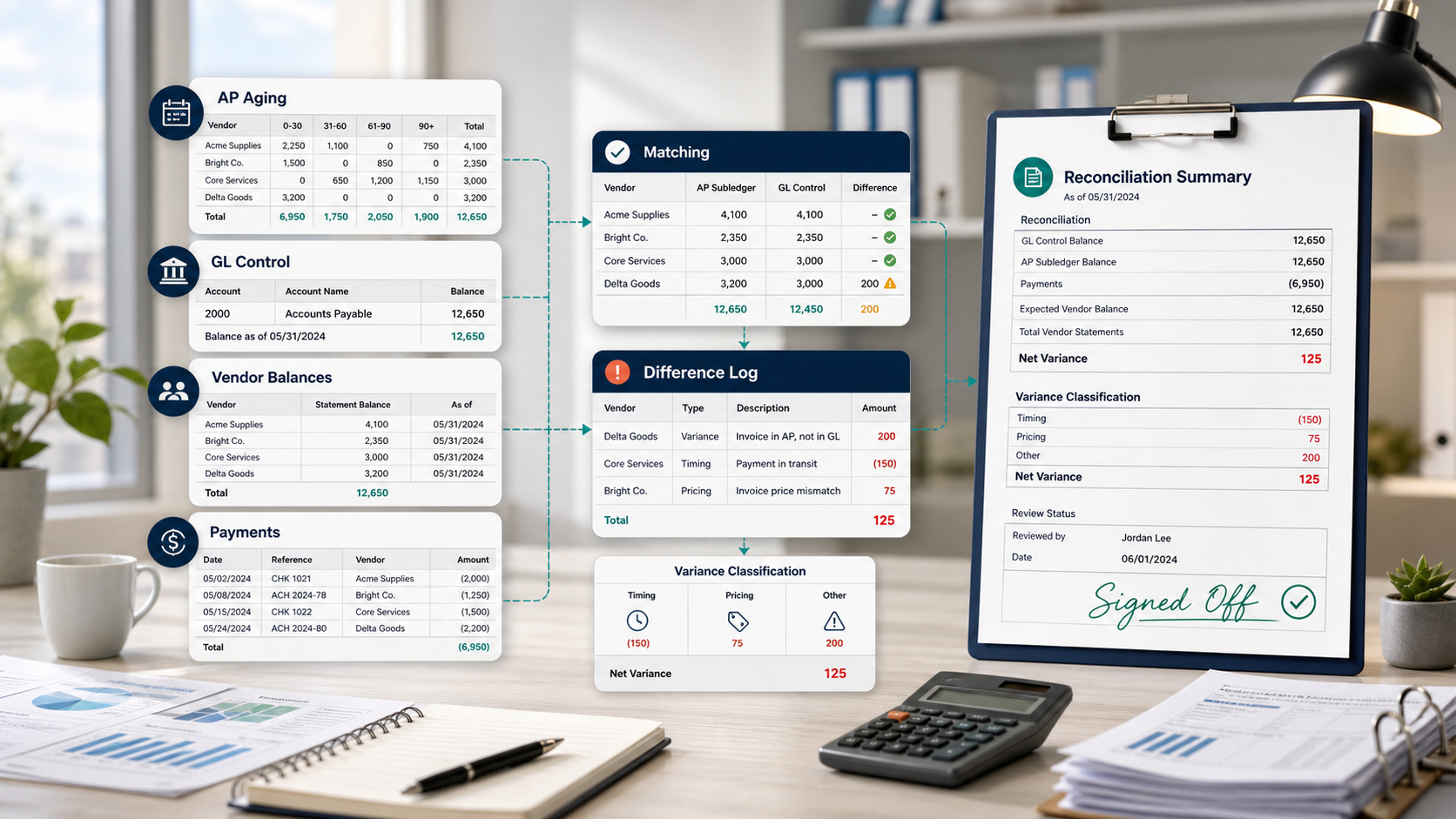
Accounts payable reconciliation is the process of comparing what your business owes to vendors with what is recorded in your accounting system. It usually involves matching supplier invoices, credit memos, payments, vendor statements, the AP subledger, and the general ledger AP control account.
The goal is to confirm that the AP balance is complete, accurate, and explainable before the accounting period is closed.
If your AP aging report shows one balance, vendor statements show another, and the general ledger shows a third, AP reconciliation helps you find the reason. The difference may be caused by an unposted invoice, a duplicate payment, an unapplied credit memo, a timing issue, or a manual journal entry posted directly to the AP control account.
Why accounts payable reconciliation matters
AP reconciliation protects both cash and financial reporting.
When it is done regularly, finance teams can:
- Confirm that vendor balances are accurate.
- Catch duplicate invoices or duplicate payments.
- Identify missing invoices, credits, or payment records.
- Keep the AP control account tied to vendor-level detail.
- Reduce supplier disputes and late-payment issues.
- Improve cash flow visibility.
- Support month-end close and audit review.
Without reconciliation, AP errors can sit inside the books for months. A supplier may be paid twice. A credit memo may never be applied. A vendor statement may show an invoice your system does not have. A manual journal may change the GL balance without any vendor-level support.
AP reconciliation vs AP aging report
An AP aging report shows unpaid invoices grouped by how long they have been outstanding.
AP aging answers: What do we owe, and how old is it?
AP reconciliation answers: Does the AP detail agree with the general ledger, and can every difference be explained?
The AP aging report is usually one input into the reconciliation. It should be compared with the AP subledger, vendor balances, payment records, and the GL AP control account.
After the totals tie, an AP dashboard review can turn the reconciled invoice population into aging KPIs, vendor exposure, and proposed payment priorities. The dashboard supports decisions; it does not replace the reconciliation control.
What records do you need?
Before reconciling AP, gather records for the same accounting period and reconciliation date.
You usually need:
- AP aging report.
- AP subledger or vendor ledger.
- General ledger detail for the AP control account.
- Vendor invoices.
- Vendor statements, when available.
- Credit memos and debit memos.
- Payment records.
- Bank statement or payment clearing report.
- Purchase orders and receiving documents, if matching applies.
- Prior-period reconciliation.
The most common mistake is mixing dates. For example, using an AP aging report as of August 31 with GL activity exported through September 2 will create false differences.
How to reconcile accounts payable
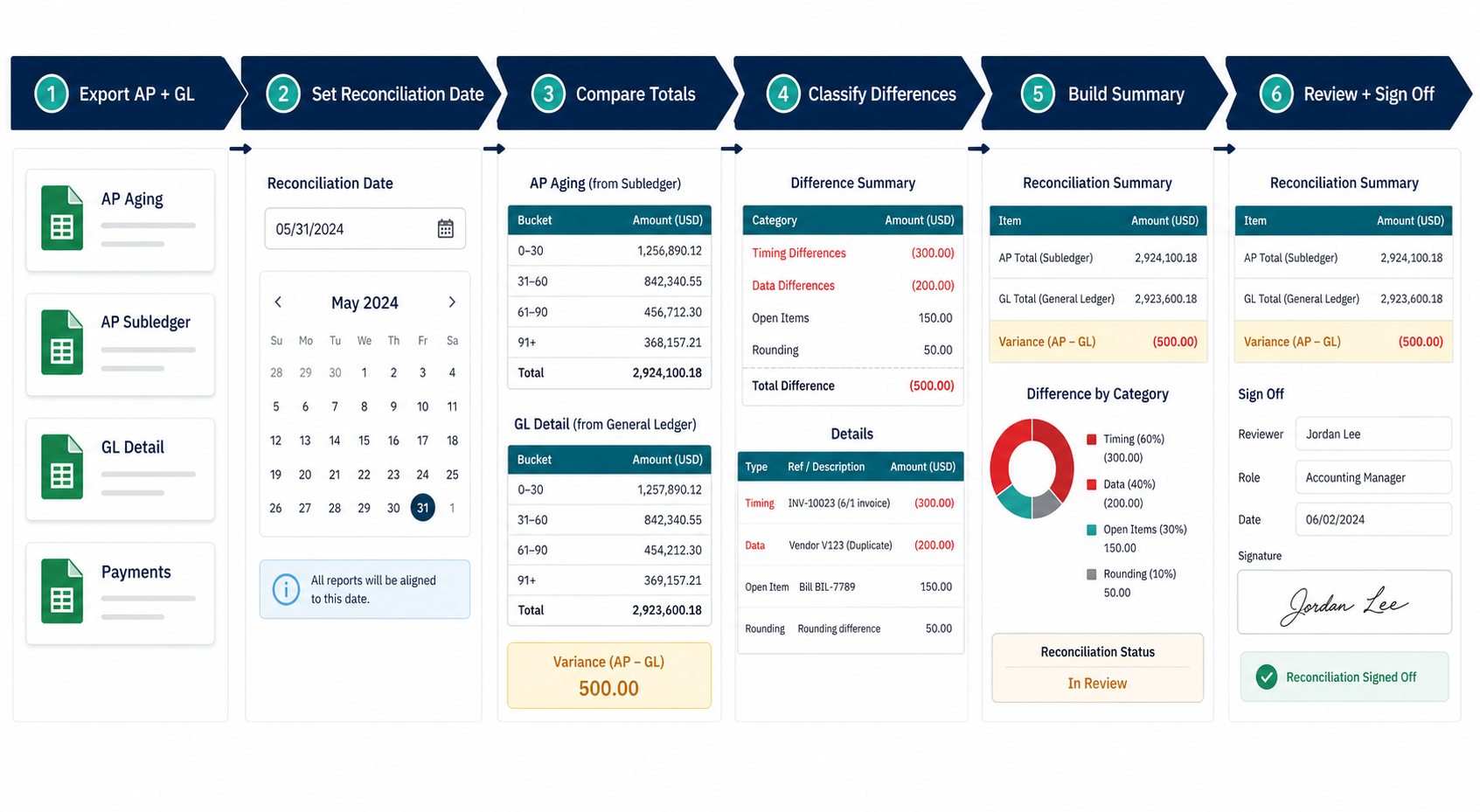
1. Check the beginning balance
Start with the prior period. The ending AP balance from the last reconciliation should agree with the opening balance for the current period.
If it does not, go back to the last period that tied out and identify what changed.
2. Collect AP documents and exports
Pull the AP aging report, AP subledger, vendor balances, invoices, payments, credit memos, and GL detail for the same period.
If your data comes from multiple systems, keep the original exports as reconciliation evidence.
3. Compare AP aging with the AP subledger
First, make sure the AP-side reports agree with each other.
If AP aging and the AP subledger do not match, investigate filters, posting dates, currencies, vendor status, or document status before comparing to the GL.
4. Compare the AP subledger with the GL control account
Next, compare the AP subledger or AP aging total with the general ledger AP control account.
AP aging or AP subledger balance
+ reconciling additions
- reconciling deductions
= GL AP control account balance
Keep the formula simple. The real work is explaining each addition or deduction by vendor, document, owner, and status.
5. Match vendor statements and invoices
For key vendors, compare vendor statements with your AP records.
Look for invoices the supplier shows but your AP system does not, credits that have not been applied, payments missing from the vendor statement, or balances that do not match your vendor ledger.
Not every vendor sends a statement, so this step is usually most useful for high-volume or high-value suppliers.
6. Verify payment records
Match payments to invoices and vendor balances.
Review payment date, payment amount, payment reference, bank clearing status, and whether the payment was posted in AP and the GL. This is where duplicate payments and timing differences often appear.
7. Investigate and classify differences
Common AP reconciliation differences include:
- Unposted invoices.
- Duplicate invoices.
- Duplicate payments.
- Unapplied credit memos.
- Missing vendor credits.
- Cutoff differences.
- Payment timing issues.
- Manual journals to AP control accounts.
- Vendor statement mismatches.
- Foreign currency revaluation differences.
Each item should have a category, vendor, document number, amount, owner, action, and status.
8. Prepare the reconciliation summary
The final reconciliation should not be a spreadsheet dump. It should clearly show:
- Reconciliation date.
- AP aging or subledger balance.
- GL AP control account balance.
- Reconciling items.
- Adjusted AP balance.
- Remaining unreconciled difference.
- Prepared by and reviewed by.
- Notes for open items.
AP reconciliation example
Assume AP aging shows $412,800 and the GL AP control account shows $418,650 as of August 31.
The difference is $5,850.
After review, the team finds:
| Item | Amount |
|---|---|
| Invoice posted in GL but missing from AP aging | $7,500 |
| Approved manual AP accrual | $2,400 |
| Credit memo in AP not posted to GL | ($1,250) |
| Payment timing item | ($2,800) |
The reconciliation becomes:
| Line | Amount |
|---|---|
| AP aging total | $412,800 |
| Add: GL-posted invoice missing from aging | $7,500 |
| Add: manual AP accrual | $2,400 |
| Less: credit memo missing from GL | ($1,250) |
| Less: payment timing item | ($2,800) |
| Adjusted AP balance | $418,650 |
| GL AP control account | $418,650 |
| Remaining difference | $0 |
How AI can help with AP reconciliation exports
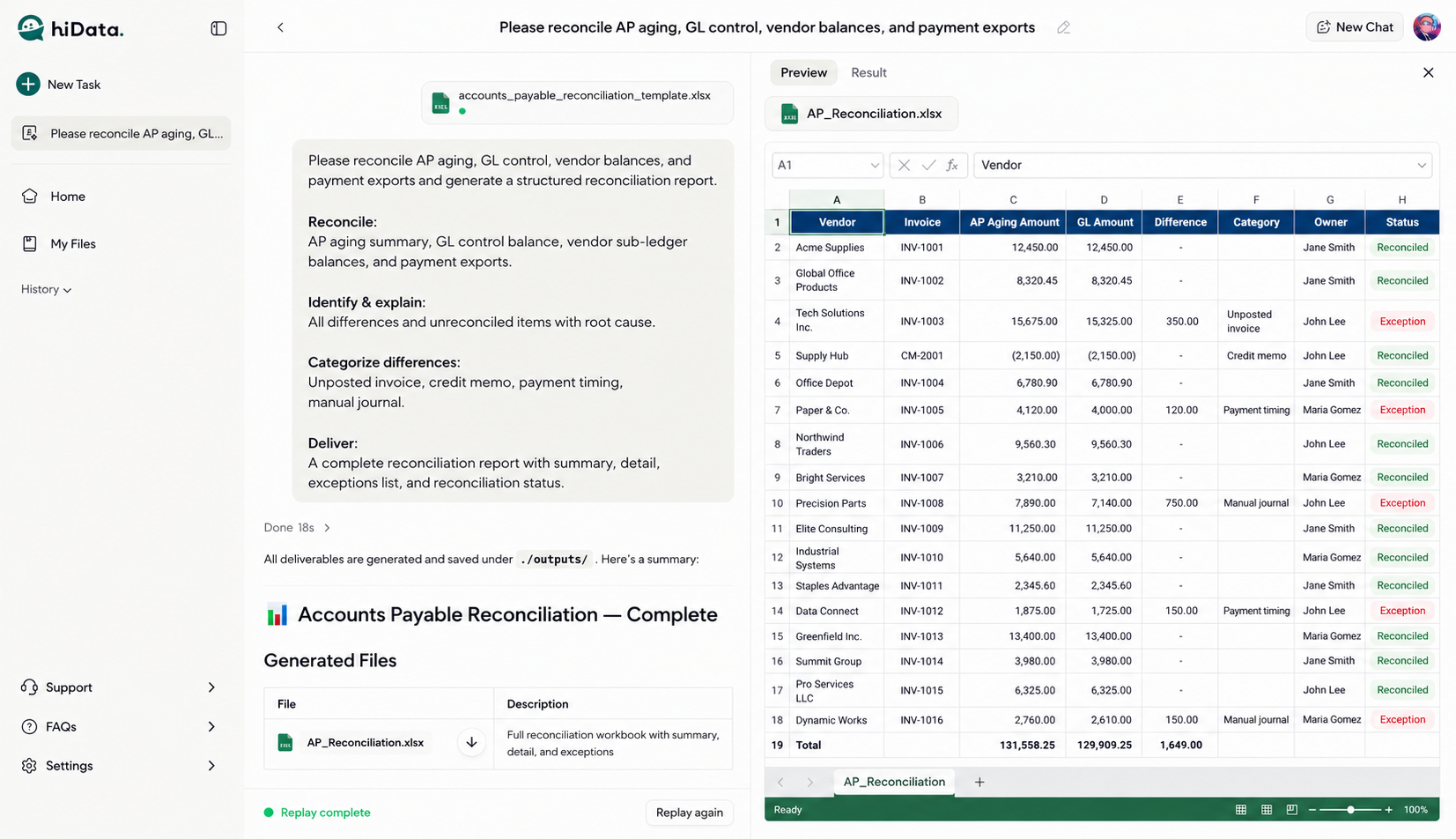
Finance teams often have the data, but it is spread across AP aging exports, GL detail, vendor reports, and payment files.
With hiData AI Sheets, users can upload those files and ask questions like:
- Which invoices appear in GL but not AP aging?
- Which payments may be duplicates?
- Which credit memos are unapplied?
- Which vendors have the largest unreconciled differences?
- Can you create a reconciliation summary by category and owner?
FAQ
What is accounts payable reconciliation?
Accounts payable reconciliation is the process of matching vendor invoices, payments, credit memos, vendor statements, AP subledger records, and the GL AP control account to confirm that the AP balance is accurate.
How often should AP reconciliation be done?
Most companies reconcile AP monthly during close. High-volume teams may also review AP weekly or before major payment runs.
Is AP reconciliation the same as bank reconciliation?
No. AP reconciliation focuses on vendor liabilities and the AP control account. Bank reconciliation focuses on matching bank activity to cash records. Payment timing can connect the two processes.
What causes AP reconciliation differences?
Common causes include missing invoices, duplicate payments, unapplied credits, timing differences, cutoff errors, vendor statement differences, and manual journals.
What is the final output of AP reconciliation?
The final output is a reconciliation summary showing source balances, reconciling items, adjusted AP balance, GL balance, unresolved items, and review sign-off.
Reconcile AP exports without rebuilding another spreadsheet
Upload your AP aging, general ledger, vendor, and payment files to hiData AI Sheets. Compare balances, surface unmatched items, and prepare a review-ready reconciliation table.