AI for FP&A helps finance teams prepare data, investigate performance, test assumptions, and draft management reporting faster. The strongest use cases do not hand financial judgment to a model. They give analysts a better starting point: cleaner inputs, prioritized exceptions, repeatable calculations, and a first draft that can be checked against source data.
For spreadsheet-based teams, that can be practical without becoming a systems-transformation project. A team can begin with approved Excel or CSV exports, document the reporting basis, ask focused questions, and keep a finance reviewer responsible for every conclusion. The aim is not an autonomous finance function. It is a shorter path from scattered files to a decision-ready analysis.
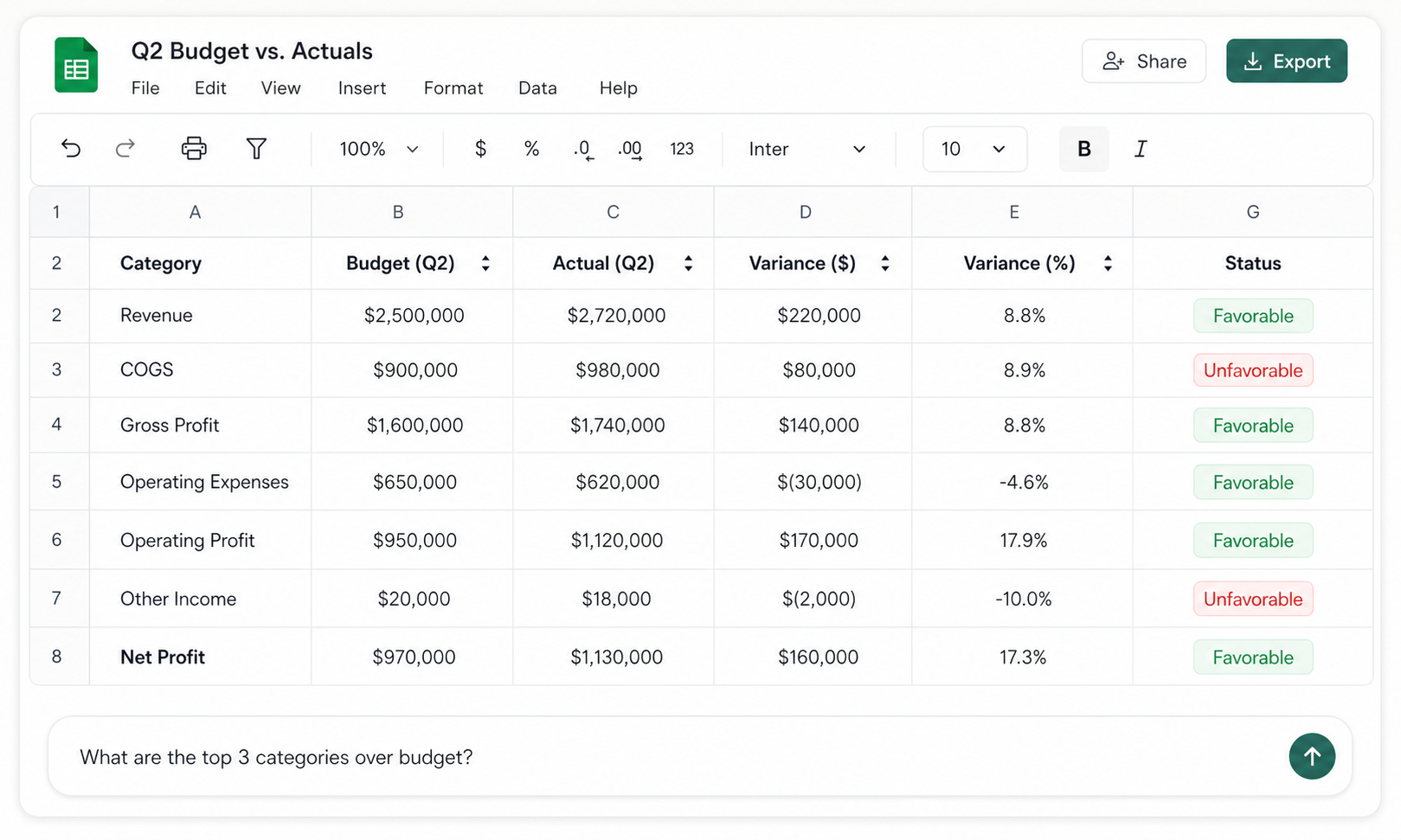
Approved visual from the hiData Finance Use Case page. It illustrates an uploaded-file analysis workflow; it is not a customer result or evidence of a direct ERP connection.
What is AI for FP&A?
AI for FP&A is the use of generative AI, predictive methods, or workflow automation to support financial planning and analysis tasks. These tasks include budgeting, forecasting, variance analysis, scenario planning, performance review, cash planning, and management reporting.
The important word is support. AI can compare tables, identify patterns, calculate defined measures, summarize available evidence, and produce a consistent first draft. It does not know which budget is approved, whether an accrual is appropriate, why a customer delayed an order, or whether management should accept a risk unless people provide and verify that context.
Oracle frames AI-driven FP&A around two recurring questions: where performance stands against targets and where the organization is likely to finish the period. Its model emphasizes data preparation, pattern detection, root-cause exploration, predictive forecasts, and narrative explanations. Those are useful categories, but the implementation depends on the tool and data environment. An integrated enterprise platform and an uploaded-spreadsheet workflow should not be described as if they offer the same connections or automation. See Oracle's AI-driven FP&A overview.
Why FP&A teams are adopting AI
FP&A work often slows down before analysis begins. Budget, actual, payroll, pipeline, headcount, and operating data may use different account names, period formats, currencies, or organizational structures. Analysts spend time aligning files, checking totals, locating material changes, and rewriting similar commentary every month.
AI is useful when it reduces that preparation burden while preserving controls. It can standardize fields, compare versions, flag exceptions, and organize supporting rows. That leaves more time for the work that requires finance judgment: challenging assumptions, talking with business owners, deciding whether a variance will recur, and explaining the effect on future performance.
Adoption is still uneven. FP&A Trends reported in 2025 that 6% of surveyed departments said they were using AI or machine learning, while 59% expected to explore it. The same article reported stronger self-rated forecast quality among users of AI or ML, but these figures describe survey respondents rather than a guaranteed causal result. They are useful as evidence of interest, not as a promise that adding AI will automatically improve a forecast. Read the FP&A Trends analysis.
Generative AI, predictive AI, and workflow automation are different
Treating every AI feature as the same technology creates bad expectations. A language model that drafts commentary is not a forecasting model. A forecasting model is not an autonomous agent. Finance leaders should know which category is being used, what data it receives, and how its output is validated.
| AI approach | Useful FP&A tasks | What it does not establish |
|---|---|---|
| Generative AI | Explain variances, summarize a P&L, suggest formulas, structure reports, draft management commentary | That the explanation is true, the accounting treatment is correct, or the recommendation is approved |
| Predictive analytics or machine learning | Estimate future values, detect patterns, quantify uncertainty, compare forecast performance | That historical relationships will continue or that an unusual future event is represented |
| Workflow automation or agents | Move a task through defined steps, apply rules, request review, produce recurring outputs | That the workflow has unrestricted system access or can make financial decisions without controls |
For many teams, generative AI applied to governed spreadsheet exports is the most accessible starting point. Predictive modeling usually needs more consistent history, a defined target, a suitable validation design, and people who can interpret model errors. Workflow automation adds another layer of permissions, monitoring, and exception handling.
Eight practical AI for FP&A workflows
The best starting use case is recurring, time-consuming, based on available data, and easy to verify. It should produce a measurable improvement without requiring the team to redesign every financial process at once.
| Workflow | Inputs | AI-supported output | Required finance review |
|---|---|---|---|
| Data preparation | Budget, actual, mapping, department and period fields | Standardized columns, mappings, duplicates and missing-value flags | Confirm scope, mappings, currency and accounting basis |
| Budget forecasting | Budget, actuals, assumptions and operational drivers | Updated forecast scenarios and assumption summary | Approve assumptions and preserve the original budget |
| Variance analysis | Actual, budget, forecast and materiality rules | Ranked variances and draft explanations | Verify signs, thresholds, source rows and causes |
| P&L review | Current, prior and budget P&L | Margin movements, expense changes and management summary | Confirm classifications, accruals and one-time items |
| Cash-flow planning | Opening cash, AR, AP, payroll and planned payments | Weekly inflows, outflows and potential shortfalls | Verify timing, restricted cash and payment commitments |
| Scenario analysis | Base model and variables to stress | Base, upside and downside comparisons | Decide plausible ranges and actions |
| Anomaly review | Transaction or account-level history | Unusual amounts, timing, vendors or combinations | Determine whether each item is valid, miscoded or incomplete |
| Management reporting | Approved analysis and source notes | First-draft commentary, charts and presentation outline | Approve every number, statement and recommendation |
1. Prepare and reconcile FP&A data
Start by aligning the reporting basis. The budget and actual files must cover the same period, entities, currency, account structure, and level of detail. Payroll may be organized by employee and cost center, while the P&L may show only department totals. Pipeline data may use calendar months while finance uses fiscal periods. AI can help map and reshape these fields, but it cannot decide the correct basis without instructions.
Keep source exports unchanged. Work from copies and include columns for source file, reporting period, version, entity, and mapping status where possible. After transformation, reconcile totals back to the original files. A clean-looking table that no longer agrees with the ledger or approved plan is not ready for analysis.
2. Build and refresh a budget forecast
A forecast should show the latest expected outcome without erasing the approved budget. AI can help compare actuals with plan, identify recurring run-rate changes, organize updated assumptions, and calculate scenarios from formulas the team defines. The analyst still decides which events are timing differences, which assumptions should change, and which risks belong in the forecast.
For example, a delayed hire may create a favorable payroll variance this month but reduce delivery capacity later. A software renewal may create an adverse monthly variance that does not change the annual total. Those situations require different forecast treatment. The full budget forecasting guide explains how to preserve the baseline while updating expectations.
3. Prioritize budget-versus-actual variances
AI can calculate actual minus budget, apply absolute and percentage thresholds, and rank the lines that need attention. That is more useful than producing commentary for every row. The finance team should define whether higher values are favorable or adverse for each line type and how zero-budget items are handled.
The next step is evidence. A model may observe that software expense is over budget, but it should not invent a renewal, seat increase, or currency movement. Ask it to identify the vendors, departments, invoices, or transaction rows contributing to the difference. When those details are unavailable, the correct output is “cause requires follow-up.” See the worked budget variance analysis in Excel for formulas and review rules.
4. Review P&L performance
P&L analysis should connect movements across the statement rather than list isolated changes. If revenue grows while gross margin falls, the review should examine price, volume, product mix, discounts, and unit cost. If operating profit declines, it should reconcile the gross-profit movement with operating-expense changes.
AI can classify rows, calculate margins, compare periods, and draft a concise summary. Finance still needs to verify account mappings, accrual treatment, eliminations, reclassifications, and one-time events. The P&L analysis workflow provides a spreadsheet-first example.
5. Maintain a short-term cash view
Cash planning combines timing-sensitive information from bank balances, receivables, payables, payroll, taxes, debt service, and planned spending. AI can help consolidate exports and organize expected cash movements by week. The resulting view should show opening cash, inflows, outflows, closing cash, and any minimum-liquidity threshold.
Human review is especially important because accounting revenue and cash receipts are not interchangeable. A receivable may be disputed, a supplier payment may be legally committed, or cash may be restricted. The 13-week cash flow forecast explains the weekly model and rollover process.
6. Run scenarios and sensitivity analysis
Scenario analysis should vary the assumptions that drive a decision, not every available number. For a revenue scenario, those drivers may include customer volume, average price, churn, conversion, or delivery capacity. For cash, they may include collection timing, supplier terms, payroll, inventory purchases, and financing dates.
AI can help produce consistent base, upside, and downside tables and explain which assumptions create the largest change. The analyst defines plausible ranges, prevents double counting, and identifies management actions. A scenario is useful when it changes a decision; a large grid of arbitrary combinations is not automatically insight.
7. Investigate anomalies and root causes
Anomaly detection can surface unusual values or combinations, such as a vendor charge far above its normal range, an expense posted to a new department, or a margin change concentrated in one product. These flags are investigation leads, not findings of error or fraud.
Root-cause analysis requires more than correlation. A revenue shortfall may coincide with lower marketing spend, but that does not prove one caused the other. Ask for contributing rows and observable drivers, compare them with business events, and document what remains unknown.
8. Draft management reporting
Generative AI is well suited to the blank-page problem. Once the analysis is approved, it can turn structured facts into a first draft with a consistent format: result, driver, future effect, risk, owner, and next action. It can also organize charts and an outline for a monthly management pack.
For the repeatable production process behind that pack, see the financial reporting automation workflow, from approved files and mappings to reconciliations and reviewed outputs.
Prime AI Solutions recommends starting with one recurring report and keeping analyst review in the workflow. Its FP&A guide focuses on forecasting, variance commentary, scenario modeling, and a narrow pilot rather than attempting full automation immediately. That incremental approach is sensible even when the underlying tools differ. Read the practical FP&A guide.
Worked example: from monthly files to a management summary
Consider an illustrative software business reviewing August performance. Budgeted revenue was $500,000 and actual revenue was $482,000. COGS was $4,000 below budget, sales and marketing was $8,000 above budget, and software expense was $8,500 above budget. Operating income finished $38,700 below plan.
The first AI task is mechanical: align the budget and actual files, calculate amount and percentage variance, and flag rows that exceed the team's thresholds. The second task is investigative: use the uploaded department and vendor details to identify which rows contribute to the material differences. The third task is communicative: draft a management summary using only supported facts.
A weak output says, “Operating income was below budget due to lower revenue and higher costs.” A useful draft is more specific: “August operating income was $38,700 below budget. The $18,000 revenue shortfall and $24,700 operating-expense overspend were partly offset by $4,000 lower COGS. Software and marketing explain $16,500 of the operating-expense variance. Finance should confirm whether the software increase is a timing item or a higher recurring run rate before updating the forecast.”
That draft still needs review. A finance analyst should confirm that the totals reconcile, the revenue and expense signs are interpreted correctly, the software rows support the statement, and no accrual or reclassification is missing. Only then should management actions be added.
A controlled workflow with hiData AI Sheets
With hiData AI Sheets, a finance team can upload approved Excel or CSV exports and ask focused questions about the data. A practical sequence is:
- Upload the budget, actuals, account mapping, and relevant supporting exports.
- State the period, currency, entity scope, sign convention, and materiality rules.
- Ask AI Sheets to standardize fields and show mapping exceptions before analysis.
- Reconcile transformed totals to the source files.
- Calculate defined metrics and identify material differences.
- Request the source rows behind each flagged result.
- Draft commentary that separates fact, inference, missing evidence, and action.
- Have the finance owner review and approve the final output.
This is an uploaded-file workflow. It does not imply a direct ERP connection, continuous database synchronization, autonomous accounting judgment, or automatic approval. Teams that require those capabilities should evaluate their system architecture, controls, and integration requirements separately. The broader hiData Finance Use Case shows how Table Creator, AI Sheets, and AI Slides support different stages of finance work.
Prompts that produce reviewable FP&A output
A good prompt defines the task and the control conditions. Instead of “analyze this budget,” specify the baseline, formula, thresholds, evidence requirements, and output format.
For variance analysis, ask: “Compare actuals with the approved budget for August using Actual minus Budget. Treat positive revenue and profit variances as favorable and positive expense variances as adverse. Flag rows where the absolute variance is at least $5,000 or 5%. For each flag, show the supporting department, vendor, or transaction rows. If the cause is not present in the uploaded files, label it for follow-up rather than inferring one.”
For management reporting, ask: “Draft a five-point summary using only reviewed figures. For each point, state the result, supported driver, whether the effect is timing or recurring if known, forecast implication, and next action. Separate confirmed facts from analyst assumptions.”
Prompts should be versioned like other working papers. Keep examples of acceptable outputs, record changes to thresholds or definitions, and avoid including confidential data in tools that have not been approved for that information.
Human review and financial controls
The control design matters more than fluent prose. Every material output should retain the source, reporting period, transformation logic, and reviewer. Calculations should reconcile to approved files. Commentary should distinguish facts from assumptions. Forecasts should preserve the original budget and identify the version of each assumption.
Data quality is a practical constraint, not a reason to abandon a pilot. FP&A Trends reported that only 22% of surveyed organizations had a single data source they could rely on. A useful pilot can begin with a governed subset, but unresolved gaps must remain visible. Do not let AI silently fill missing values, merge ambiguous accounts, or convert currencies without documented rules.
Security and access also need explicit decisions. Determine which files may be uploaded, whether they contain payroll or personal data, who can view the analysis, how long data is retained, and whether outputs can be exported. The article should not substitute generic reassurance for the organization's actual security review.
A six-step implementation plan
1. Choose one recurring decision
Select a workflow with a clear owner and measurable pain point, such as monthly variance commentary or a weekly cash review. Avoid beginning with “automate FP&A.” Define the decision the output supports and what a successful result looks like.
2. Establish the baseline
Measure the current cycle time, number of manual steps, review effort, error rate, and reporting delay. Without a baseline, a polished demo can be mistaken for business value.
3. Prepare a governed data set
Use a limited number of approved files. Document their owners, definitions, periods, and reconciliation totals. Resolve enough mapping and completeness issues to run the pilot while recording any known limitations.
4. Run in parallel
Produce the AI-assisted output alongside the existing process for several cycles. Compare calculations, commentary, exceptions, and review time. Track where the AI output required correction instead of evaluating it by appearance alone.
5. Define approval and escalation
Specify which outputs require analyst review, who approves changes to assumptions, and what happens when data does not reconcile. A model should not progress from a warning to a published management statement without an accountable reviewer.
6. Expand only after the control works
Once the narrow workflow is reliable, reuse its definitions, prompts, mappings, and review rules in the next adjacent process. Oracle also recommends starting with a focused pilot, engaging users early, and scaling after the team has evidence and confidence.
How to measure whether AI for FP&A is working
Measure the workflow, not the novelty of the tool. Useful operational metrics include time from data receipt to reviewed report, hours spent preparing versus interpreting data, percentage of material variances with traceable support, commentary editing time, and the number of unresolved mapping exceptions.
For forecasting, track error by forecast horizon, business unit, and driver. A single company-wide accuracy percentage can hide weak areas. Compare the AI-assisted approach with the prior process over enough periods to include normal variation, and record whether overrides improved or weakened the result.
Adoption measures matter too. Track how often analysts use the workflow, where they abandon it, which outputs require major rewriting, and whether decision makers receive the information early enough to act. The goal is not to maximize the number of AI-generated paragraphs. It is to improve the speed, traceability, and usefulness of finance decisions.
How to choose an AI tool for FP&A
Begin with the data environment and control requirements. A team working mainly from recurring Excel exports may value file handling, transparent tables, formula support, source traceability, and easy export. A large enterprise may need embedded planning models, identity controls, workflow approvals, and governed integrations. A general-purpose language model may help with drafting but require a separate method for calculations and evidence.
Ask vendors to demonstrate the exact workflow with representative data. Check how the tool handles missing fields, duplicate rows, zero denominators, mixed currencies, version changes, and requests that cannot be answered from the available data. Review security, retention, permissions, exportability, and audit needs before using sensitive finance files.
Do not select a tool because it can produce the most confident narrative. Select it because the team can understand the inputs, reproduce the calculations, inspect the evidence, and maintain a clear human approval point.
Common mistakes
The first mistake is starting with a broad transformation promise instead of one controlled workflow. The second is asking AI to explain a variance without giving it transaction or operational evidence. The third is confusing generative commentary with a validated predictive forecast.
Other common failures include uploading mismatched periods, allowing account mappings to change without review, hiding forecast overrides, treating correlation as a root cause, and publishing language that no named finance owner approved. Automating a weak process makes the weakness faster and harder to see.
Frequently asked questions
Can AI replace FP&A analysts?
AI can automate preparation, calculations, exception detection, and first drafts, but it cannot replace accountable financial judgment, business context, stakeholder conversations, or approval. The analyst's role shifts toward validation, interpretation, challenge, and decision support.
What is the best first AI use case for an FP&A team?
A recurring and reviewable task is usually best. Monthly variance prioritization and commentary are strong candidates because the inputs, thresholds, prior process, and final output can be compared directly.
Can AI analyze Excel files for FP&A?
Yes. AI tools can help standardize uploaded spreadsheets, calculate defined metrics, compare periods, flag exceptions, and draft summaries. The team should reconcile totals, verify mappings and formulas, and review every material conclusion.
Does AI forecasting require years of historical data?
The requirement depends on the method, frequency, seasonality, and number of drivers. A predictive model may need substantial consistent history for validation. Generative AI can still help organize assumptions and compare scenarios with less history, but that is not the same as training a reliable forecasting model.
How should FP&A teams validate AI output?
Reconcile calculations to approved sources, inspect the rows supporting each result, separate facts from assumptions, run the process in parallel, record corrections, and require a named finance reviewer before publication.
Can ChatGPT or another general AI tool perform financial analysis?
It can assist with formulas, explanations, and drafts when given suitable data and instructions. It should not be treated as a financial adviser, a source of approved company data, or an autonomous decision maker. Confidentiality and tool approval must be addressed before uploading finance information.
What is the difference between AI for FP&A and AI in finance?
AI in finance is the broader category and may include accounting, payments, fraud, treasury, tax, audit, and financial services. AI for FP&A focuses on planning, forecasting, performance analysis, scenarios, and management reporting.
Build a reviewable FP&A workflow with hiData
Upload approved budget, actual, forecast, P&L, cash-flow, or supporting Excel and CSV exports to AI Sheets. Standardize the files, investigate material changes, compare scenarios, and prepare a first management summary while keeping finance review in control.