
Accounts Receivable Aging Report: Example, Buckets, and Free Excel Template
An accounts receivable aging report helps you see which customer invoices are still unpaid, how long they have been outstanding, and which accounts need collection follow-up first.
Instead of looking at one long invoice list, an AR aging report groups open receivables into aging buckets such as Current, 1-30 days past due, 31-60, 61-90, and 90+ days. This makes it easier to understand overdue risk, customer payment behavior, and near-term cash collection opportunities.
What Is an Accounts Receivable Aging Report?
An accounts receivable aging report is a financial report that organizes unpaid customer invoices by how long they have been outstanding or overdue.
For each customer or invoice, the report usually shows customer name, invoice number, invoice date, due date, original invoice amount, payments or credits applied, open balance, days outstanding or days past due, and aging bucket.
The purpose is simple: show how much money customers owe you, how old those receivables are, and where collection attention is needed.
AR Aging vs AP Aging Report
An AR aging report and an AP aging report both group balances by age, but they answer opposite questions.
An accounts receivable aging report shows money owed to your business by customers. It supports collections, cash forecasting, credit risk review, and bad debt analysis.
An accounts payable aging report shows money your business owes to vendors. It supports payment planning, vendor management, and short-term cash outflow control.
Read the AP aging report guide for the payables side of the same aging process.
Should AR Aging Use Invoice Date or Due Date?
Most AR aging reports should use the due date to calculate overdue buckets.
That means the aging bucket is based on how many days an invoice is past due, not simply how many days have passed since the invoice was issued.
For example:
- Invoice date: January 1
- Payment terms: Net 30
- Due date: January 31
- Report date: February 15
This invoice is 45 days old by invoice date, but only 15 days past due. In most collections reports, it belongs in the 1-30 days past due bucket.
Using the due date is usually better because it respects payment terms. A Net 60 customer should not appear overdue after 30 days if the invoice is not due yet.
Common AR Aging Buckets
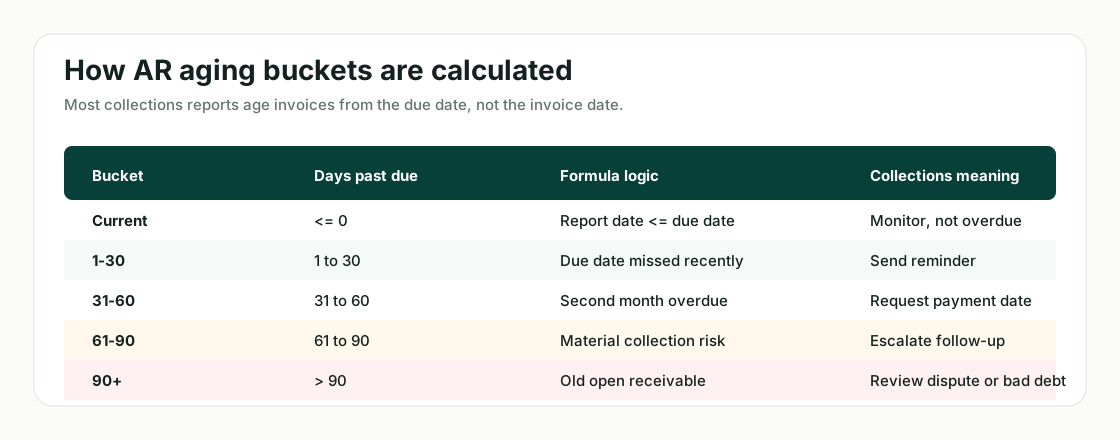
Most accounts receivable aging reports use these buckets:
- Current: not yet due
- 1-30 days: 1 to 30 days past due
- 31-60 days: 31 to 60 days past due
- 61-90 days: 61 to 90 days past due
- 90+ days: more than 90 days past due
Days Past Due = Report Date - Due Date.
Some businesses add more detail, such as 91-120 and 120+ days. But for most teams, the five-bucket structure is enough for a useful collections review.
How to Build an Accounts Receivable Aging Report in Excel
To build an AR aging report in Excel, start with invoice-level data. Ideally, your source file should include invoice records, payment records, and customer details.
1. Prepare your source data
You will usually need:
- Invoice list or AR ledger
- Payment export
- Credit memo export
- Customer master file
- Bank deposit or cash receipt file
Use the same fixed as-of date across these sources. When cash receipts do not agree with bank activity, a bank reconciliation review can help explain timing and matching differences.
At minimum, your invoice list should include customer name, invoice number, invoice date, due date, invoice amount, amount paid, credit memo amount, and open balance.
Open Balance = Invoice Amount - Payments Applied - Credits Applied.
2. Choose a report date
The report date is the date you use to calculate aging. Every invoice should be aged against the same report date.
3. Calculate days past due
Add a column called Days Past Due. If the report date is in cell B1 and the due date is in F2, the Excel formula can be written as =$B$1-F2.
4. Assign each invoice to an aging bucket
Add an Aging Bucket column with rules such as:
- G2 <= 0: Current
- G2 <= 30: 1-30
- G2 <= 60: 31-60
- G2 <= 90: 61-90
- G2 > 90: 90+
5. Summarize by customer and bucket
Use a pivot table or summary table to group open balances by customer and aging bucket.
Rows: Customer.
Columns: Aging Bucket.
Values: Sum of Open Balance.
Accounts Receivable Aging Report Example
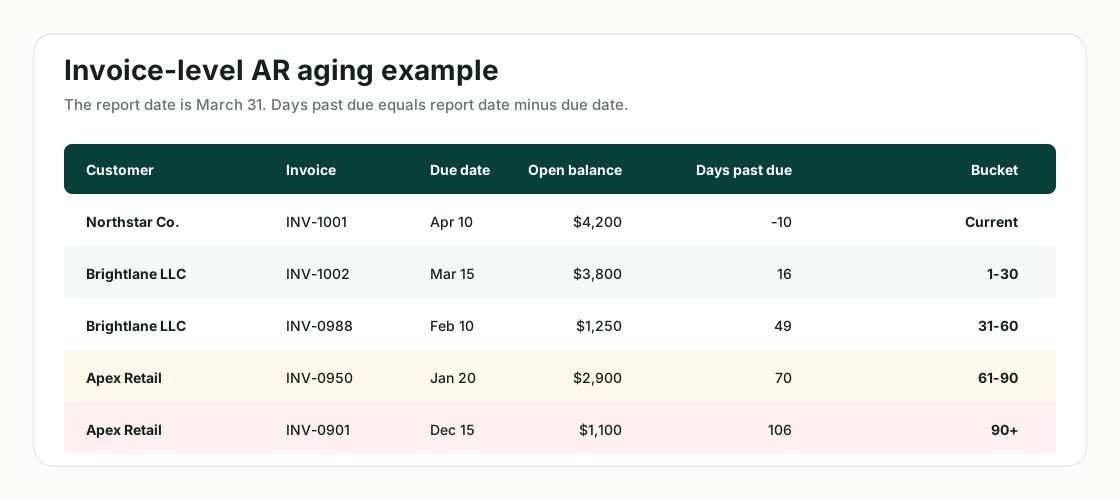
Assume the report date is March 31.
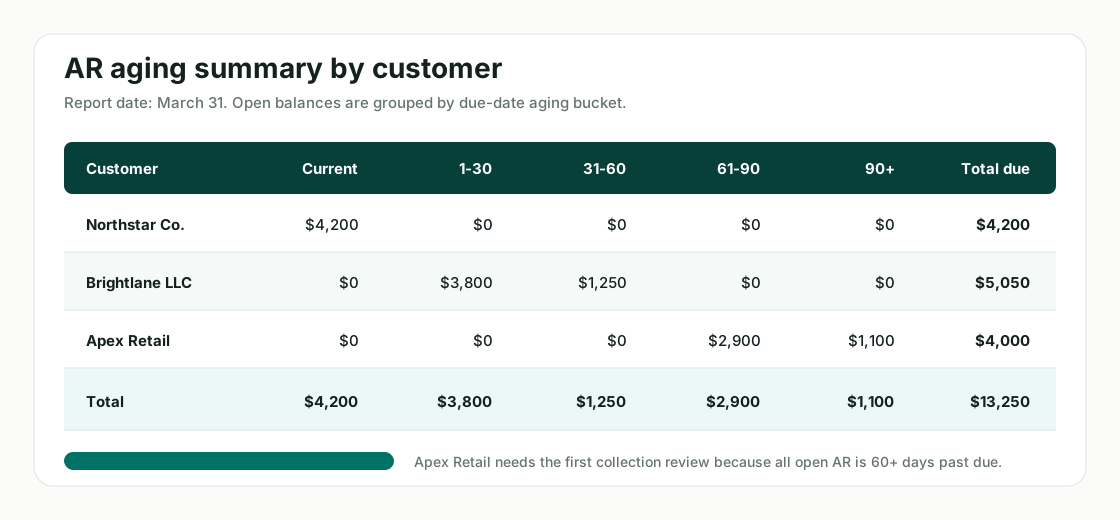
Northstar Co. has a $4,200 invoice due on April 10, so it is current. Brightlane LLC has one $3,800 invoice that is 16 days past due and another $1,250 invoice that is 49 days past due. Apex Retail has $2,900 in the 61-90 day bucket and $1,100 in the 90+ bucket.
From this view, Apex Retail is the highest collection priority because all of its open balance is more than 60 days past due.
Brightlane LLC also needs follow-up, but part of its balance is only 16 days overdue. Northstar Co. is current and does not need collection escalation.
Free Accounts Receivable Aging Excel Template
A useful AR aging Excel template should include at least three tabs:
- Invoice Detail
- Aging Summary
- Collections Review
The Invoice Detail tab should contain all invoice-level records and formulas for open balance, days past due, and aging bucket.
The Aging Summary tab should summarize open balances by customer and bucket.
The Collections Review tab should help your team decide who to contact first.
Suggested template columns:
- Customer Name
- Customer ID
- Invoice Number
- Invoice Date
- Due Date
- Invoice Amount
- Payments Applied
- Credits Applied
- Open Balance
- Days Past Due
- Aging Bucket
- Dispute Status
- Collection Owner
- Next Action
- Notes
How to Use AR Aging for Collections Priority
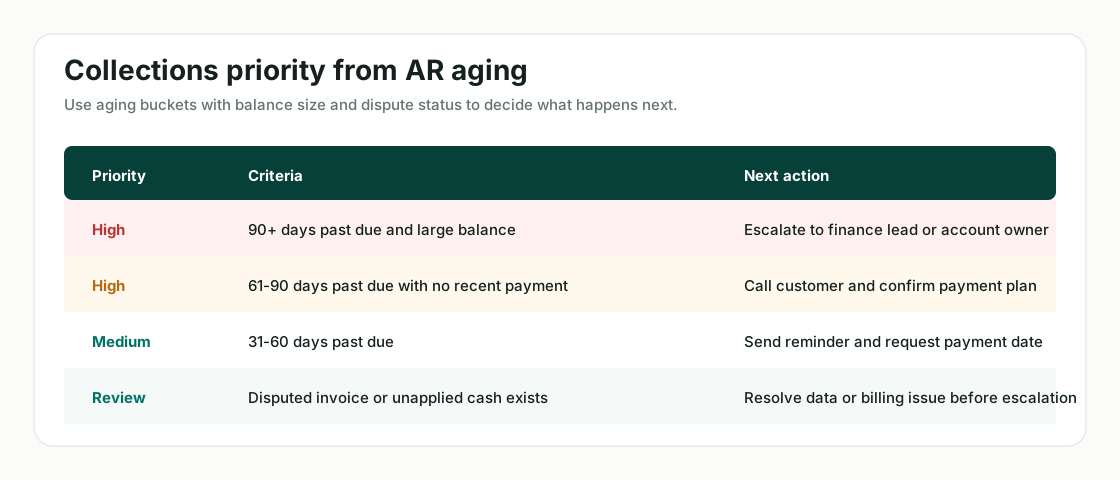
An AR aging report is not just an accounting report. It should help your team decide what to do next.
A good collections review looks at more than total balance. It considers age, customer importance, dispute status, and likelihood of payment.
For cash forecasting, AR aging also helps estimate likely collections. Current and 1-30 day balances may be more collectible in the near term, while 90+ balances may need a lower collection probability or bad debt review.
Use the reviewed collection outlook as an input to a 13-week cash flow forecast, rather than treating every open invoice as cash arriving on time.
It can also improve a broader budget forecast by separating expected collections from balances that need additional follow-up.
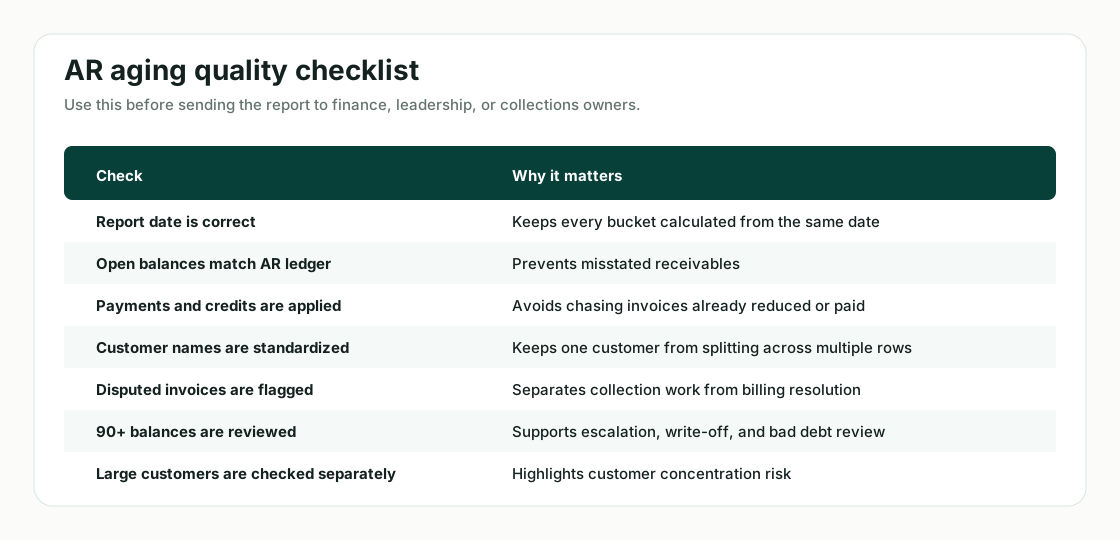
Common AR Aging Mistakes
Not deducting payments already received
If payments are not applied to the correct invoices, your aging report may overstate overdue balances.
Keep the billing and payment records behind the report traceable through a consistent invoice processing workflow.
Unapplied cash
Sometimes customers pay, but the payment is not matched to a specific invoice. This creates unapplied cash.
Duplicate customer names
The same customer may appear under slightly different names. This can split the customer's balance across multiple rows and make collections review harder.
Using invoice date instead of due date
If your aging method is based on due date, but the report uses invoice date, invoices may appear overdue too early.
Mixing disputed invoices with collectible invoices
A disputed invoice should not be treated the same way as a normal overdue invoice.
Including written-off or bad debt invoices
Old invoices that have already been written off should not remain in the active collections queue.
Not updating the report date
If the report date is stale, every bucket may be wrong.
How hiData Helps Build AR Aging Reviews
Many AR aging problems start before the report is created. Invoice exports, payment files, customer lists, and bank deposits often come from different systems and do not match cleanly.
hiData helps organize those files into a clearer AR aging review.
You can upload:
- Invoice exports
- AR ledger files
- Payment reports
- Customer master files
- Bank deposit files
- Credit memo exports
hiData can help structure the data into overdue buckets, identify unmatched payments, surface customer name inconsistencies, and prepare a collections review view.
Build Your AR Aging Review with hiData
Upload your invoice, payment, customer, and bank deposit exports to organize overdue receivables, aging buckets, and collection priorities.
hiData helps turn scattered AR files into a clearer collections review, so your team can focus on the customers and invoices that need attention first.
Build your AR aging review in hiData
FAQ
What is an accounts receivable aging report?
An accounts receivable aging report is a report that groups unpaid customer invoices by how long they have been outstanding or overdue. It helps businesses manage collections and understand receivables risk.
What are standard AR aging buckets?
The most common AR aging buckets are Current, 1-30 days past due, 31-60 days past due, 61-90 days past due, and 90+ days past due.
Should AR aging be based on invoice date or due date?
Most AR aging reports should be based on due date because the due date reflects the customer's payment terms. Invoice date can also be tracked separately, but due date is usually better for collections.
How do you calculate days past due?
Days past due is calculated as Report Date - Due Date. If the result is zero or negative, the invoice is usually considered current.
Why is AR aging important?
AR aging helps businesses identify overdue invoices, prioritize collections, estimate near-term cash inflows, review customer payment behavior, and assess bad debt risk.
What should be included in an AR aging Excel template?
An AR aging Excel template should include customer name, invoice number, invoice date, due date, invoice amount, payments applied, credits applied, open balance, days past due, aging bucket, dispute status, collection owner, and notes.