A month-end close checklist in Excel should do more than show which tasks are finished. It should identify the owner, deadline, dependency, supporting evidence, reviewer, and unresolved exceptions for every material close activity. That turns a list of boxes into a repeatable control for moving from open transactions to reviewed financial statements.
This guide explains how to structure that workbook, which steps belong in the close, and where an AI-assisted review can help. The workflow starts with exported Excel or CSV files. It does not assume a direct connection to an ERP, bank, payroll system, or general ledger, and it does not hand accounting judgment or approval to AI.
Download the free month-end close checklist Excel template to follow the worked example or replace the illustrative tasks with your own close calendar.
Key takeaways
- A completed task is not necessarily a signed-off control. Evidence and review should be tracked separately from task status.
- The close should begin before period end. Cut-off communication, document collection, recurring schedules, and some reconciliations can be prepared during the month.
- Sequence work by dependency. Transaction capture and cut-off come before final reconciliations; reconciliations and adjustments come before reporting and period lock.
- Excel is useful for ownership, deadlines, dependencies, exceptions, and status. It should link to supporting workpapers rather than pretend the checklist itself proves every balance.
- AI can check uploaded files for missing fields, overdue tasks, mapping problems, unusual movements, and unsupported commentary. Finance still decides the accounting treatment and approves the close.
What is a month-end close checklist?
A month-end close checklist is a controlled schedule of the tasks required to finalize an accounting period. It coordinates transaction capture, cut-off, account reconciliations, adjusting entries, financial review, reporting, sign-off, and period lock.
The checklist is not the close itself. Marking "bank reconciliation complete" does not prove that the bank balance agrees to the ledger or that every reconciling item is explained. The stronger design records what evidence supports the task and who reviewed it. This is also the most useful idea in Phacet's month-end close checklist: a checked box and a defensible control are not the same thing.
The workbook should answer four questions at any time: What remains open? What is blocked? Which completed tasks still need review? What evidence supports the conclusion that the books are ready to close?
Build the Excel checklist around control, not decoration
Keep one row per task and use stable task IDs so the same activity can be compared across periods. Use dropdown values instead of free-text statuses. Preserve a protected master, create a new period copy, and archive the completed file rather than overwriting last month's record.
| Excel column | Purpose | Example |
|---|---|---|
| Task ID | Stable reference across periods | CASH-01 |
| Phase / area | Groups related work | Cash and bank |
| Task | States one clear action | Reconcile operating account |
| Owner | Names one accountable preparer | Staff accountant |
| Due day / date | Sets the close deadline | Business day 2 |
| Dependency | Shows what must finish first | Final bank statement available |
| Status | Tracks execution | Not started / In progress / Blocked / Complete |
| Evidence link | Points to the final workpaper | Bank reconciliation file |
| Exception | Explains unresolved differences | Deposit clears next period |
| Reviewer / review date | Separates preparation from approval | Controller / September 4 |
| Sign-off status | Shows whether the control is accepted | Open / Awaiting review / Signed off |
Do not add a column merely because another template includes it. Every field should support execution, evidence, review, or improvement. A small team may combine the due day and date, while a multi-entity team may need entity, currency, materiality, and local reviewer fields.
The month-end closing process in five phases
The exact task list depends on the business, accounting policies, systems, and reporting obligations. The following structure provides a practical core. Industry-specific work, such as inventory valuation, revenue recognition, fund accounting, or regulatory reporting, should be added only where it applies.
The sequence also reflects the recurring work covered by practical checklists from Double and Finlens: prepare inputs, capture the period, reconcile balances, post adjustments, and complete review and sign-off.
Phase 1: Prepare before period end
The fastest controlled close moves predictable work out of the compressed post-close window. Confirm the period, entity scope, reporting currency, materiality rules, close calendar, and final reporting deadline. Send cut-off instructions to budget owners and identify the documents they must provide.
Prepare recurring schedules for depreciation, amortization, leases, prepayments, payroll, interest, and regular accruals. Check whether bank feeds, payment processors, payroll reports, and subledger exports are available. Review prior-period reconciling items and decide whether each one cleared, remains valid, or requires escalation.
Typical pre-close tasks include:
- Confirm period, entities, currencies, and reporting basis.
- Assign an owner and reviewer to every applicable task.
- Communicate invoice, expense, revenue, and journal cut-off dates.
- Request missing statements, payroll reports, contracts, and operational schedules.
- Roll forward recurring reconciliations and adjustment schedules.
- Review open exceptions from the previous close.
Phase 2: Complete transaction capture and cut-off
Before final reconciliations, confirm that the period contains the transactions that belong in it and excludes transactions that belong elsewhere. Cut-off is about economic timing, not simply invoice date. A service received in the current month may require an accrual even if the invoice arrives later.
Record or identify outstanding customer invoices, supplier bills, employee expenses, payroll, cash transactions, inventory movements, and payment-processor activity. Review late postings and transactions immediately before and after period end. Keep an exceptions list for missing documents, disputed items, and transactions whose accounting period is not yet resolved.
Core capture and cut-off tasks include:
- Record valid bank, card, sales, purchasing, payroll, and expense activity through period end.
- Identify goods or services received but not yet invoiced.
- Identify earned revenue not yet invoiced and cash received for future periods.
- Review transactions around the cut-off date for the correct accounting period.
- Clear or explain uncoded, duplicate, rejected, and suspended transactions.
- Confirm all expected subledger batches have posted to the general ledger.
Phase 3: Reconcile accounts and investigate differences
Reconciliations compare a ledger balance with an independent source or supporting schedule. Every remaining difference should have an amount, reason, age, owner, and expected resolution. A plug entry that forces the reconciliation to zero is not a resolution.
Start with cash and high-volume control accounts, then work through the remaining balance sheet. Reconcile bank and credit-card accounts, payment processors, accounts receivable, accounts payable, payroll controls, inventory, fixed assets, prepayments, accruals, debt, tax, intercompany, and suspense accounts as applicable.
The supporting process matters as much as the final balance. A bank reconciliation should distinguish timing items from errors. An accounts payable reconciliation should tie vendor detail to the AP control account and explain every difference. Payroll should reconcile approved payroll reports, payment records, liabilities, and the general ledger before sign-off.
Phase 4: Post and review adjusting entries
Adjustments place revenue, expenses, assets, and liabilities in the correct period and classification. Common entries include accruals, prepaid releases, depreciation, amortization, deferred revenue, foreign-currency revaluation, inventory adjustments, provisions, intercompany eliminations, and reclassifications.
Each material journal should show the accounting purpose, calculation, source documents, preparer, reviewer, posting date, and reversal treatment when relevant. Recompute the entry or agree it to an approved schedule before posting. For estimates, document the method and assumptions rather than copying the prior month without review.
After posting, refresh the trial balance and confirm that affected reconciliations still agree. If a late journal changes a reviewed account, return that task to review instead of leaving the old sign-off in place.
Phase 5: Review results, report, sign off, and lock
Once reconciliations and adjustments are complete, review the financial statements as a connected set. Confirm that the trial balance balances, retained earnings roll forward correctly, and the balance sheet, income statement, and cash-flow presentation use the intended period and entity scope.
Run a balance-sheet movement review and compare the P&L with the prior period, budget, or forecast. Investigate material changes rather than commenting on every line. The existing P&L analysis workflow explains how to connect revenue, COGS, margin, and operating expenses; the budget variance analysis guide covers favorable and adverse interpretation.
Complete the close file only after the preparer and reviewer have resolved or formally carried forward remaining exceptions. Distribute approved reports, record final sign-off, and lock the accounting period according to company policy. Reopening a period should require a documented reason and approval.
Useful Excel formulas and controls
Assume the checklist is an Excel table named CloseTasks. A simple completion rate is:
=COUNTIF(CloseTasks[Status],"Complete")/COUNTA(CloseTasks[Task ID])
An overdue flag can be calculated row by row:
=IF(AND([@Status]<>"Complete",[@[Due Date]]<TODAY()),"Overdue","")
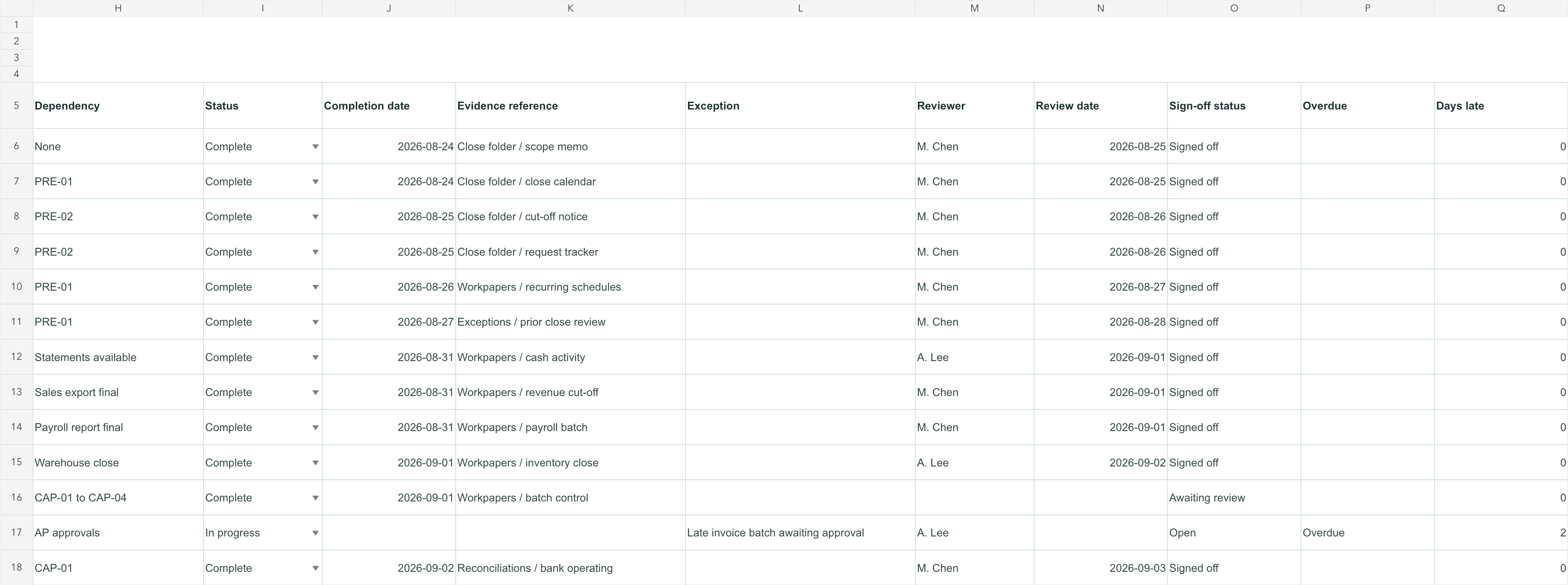
Keep execution and review separate. A completed task with no evidence should not appear signed off:
=IF([@Status]<>"Complete","Open",
 IF([@[Evidence Link]]="","Missing evidence",
 IF([@[Review Date]]="","Awaiting review","Signed off")))
Use conditional formatting to highlight blocked, overdue, missing-evidence, and awaiting-review rows. Color is a navigation aid, not proof. Keep the text label visible so the workbook remains understandable when printed, exported, or viewed by someone who cannot distinguish the colors.
Worked example: finding the real close bottleneck
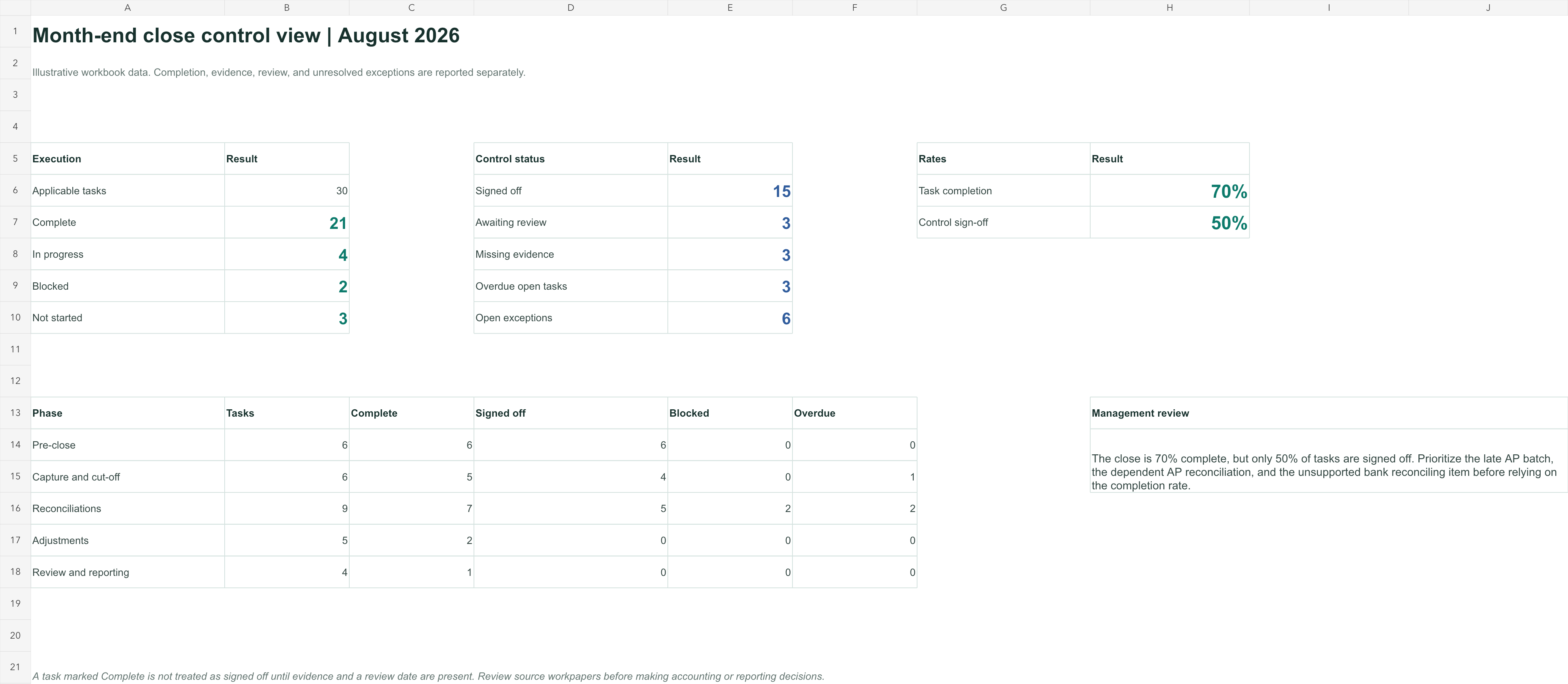
Consider an illustrative checklist with 30 applicable tasks on business day 3. Twenty-one tasks are complete, four are in progress, two are blocked, and three have not started. That produces a 70% task-completion rate, but it does not mean the close is 70% reliable.
| Review measure | Result | What it means |
|---|---|---|
| Tasks complete | 21 of 30 | Execution is progressing |
| Complete tasks with evidence | 18 of 21 | Three completed tasks lack support |
| Signed-off tasks | 15 of 30 | Only half the checklist has passed review |
| Blocked tasks | 2 | Both need an owner and next action |
| Overdue tasks | 3 | Deadline or dependency needs attention |
Suppose the AP subledger-to-GL reconciliation is blocked because the final AP export does not include a late invoice batch. That one task affects the AP balance, accrual review, expense completeness, P&L analysis, and final reporting. The right response is not to chase five downstream tasks independently. It is to resolve the missing batch, refresh the AP reconciliation, and then release the dependent work.
This is why the checklist needs dependencies and exceptions, not only a percentage-complete chart. A low-volume critical task can determine the close date even when dozens of routine tasks are already finished.
Use AI as a review layer for uploaded close files
AI is most useful after the close scope and control rules are defined. With hiData AI Sheets, a finance team can upload approved Excel or CSV files, clean and classify fields, process tables, identify patterns, and create visual summaries. For this workflow, useful inputs may include the close checklist, current and prior trial balances, reconciliation summaries, AP or AR exports, payroll summaries, and the team's materiality rules.
This review layer fits the broader planning and reporting model described in AI for FP&A and hiData's Finance use case, while keeping the final accounting decision with the finance team.
Begin with completeness rather than analysis:
Check the uploaded close checklist for missing task IDs, owners, due dates, dependencies, evidence links, reviewers, and statuses. List the affected rows without filling missing values automatically.
Then ask for operational exceptions:
Identify overdue and blocked tasks. Show which downstream tasks depend on them, which completed tasks are missing evidence, and which tasks are waiting for review. Use only the uploaded checklist.
After approved financial data are available, ask for a controlled review:
Compare the current and prior trial balances using the supplied materiality thresholds. For every flagged account, show the supporting rows available in the uploaded files. If the files do not establish a cause, label it "requires finance follow-up" rather than inventing an explanation.
Finally, request a close-status draft that separates confirmed facts, open questions, owners, and next actions. A finance reviewer should verify every number and conclusion before the summary is shared.
This is an uploaded-file analysis workflow. It does not imply that hiData connects directly to the ERP or bank, monitors controls continuously, posts journals, approves accounting treatment, stores the official audit trail, or locks the accounting period. Teams that need those functions should evaluate dedicated close-management and accounting-system capabilities separately.
Common month-end close checklist mistakes
Treating complete as approved. A preparer may have finished the work while the reviewer has not examined it. Track execution status and sign-off status separately.
Using team names instead of accountable owners. "Accounting" cannot answer a blocker. Assign one person to prepare and one person to review each material control, where team size permits.
Running every task in sequence. Some activities can proceed in parallel, but only when their inputs are ready. Record dependencies so parallel work does not become premature work that must be repeated.
Generating reports before late journals are approved. Preliminary statements are useful for review, but they should be labelled clearly. Final reporting belongs after adjustments and affected reconciliations have been refreshed.
Leaving evidence in personal folders or email. The checklist should point to the final support in an approved location. A path that only the preparer can access will fail when someone else reviews the close.
Overwriting the prior month's workbook. Preserve each completed period with its evidence and sign-off history. Roll forward the master structure, not the previous period's completion state.
Allowing AI to turn missing evidence into a confident explanation. A plausible narrative is not an accounting conclusion. Require source rows and label unsupported causes for follow-up.
Improve the process after every close
There is no universal number of days that proves a close is effective. A shorter close is useful only if reconciliations, evidence, review, and reporting remain sound. Establish the current baseline before setting a target.
Track the actual completion date, overdue days, blocker category, review rework, missing-evidence count, late-journal count, and period reopenings. After sign-off, identify the few tasks that most affected the critical path. Fix their inputs, ownership, timing, or instructions before adding more automation.
Move repeatable collection and preparation work earlier in the month. Keep judgment-heavy decisions, material entries, and final sign-off with accountable finance professionals. The objective is a close that becomes more predictable and easier to defend, not merely a dashboard that turns green sooner.
Frequently asked questions
What should a month-end close checklist include?
It should include each task's phase, owner, deadline, dependency, status, evidence, exception, reviewer, review date, and sign-off status. Add entity, currency, account, or materiality fields when the close requires them.
How do I create a month-end close checklist in Excel?
Create one Excel table with one row per task, use controlled dropdowns for status, add formulas for overdue and sign-off conditions, and create a small summary by phase and owner. Keep a protected master and archive a separate completed file for every period.
What is the correct order for month-end close?
Prepare the close, complete transaction capture and cut-off, reconcile accounts, post and review adjustments, review the financial statements, obtain sign-off, and then lock the period. Some tasks can run in parallel, but their dependencies must be respected.
How long should the month-end close take?
There is no universal duration. It depends on transaction volume, entities, systems, staffing, accounting complexity, input availability, and control requirements. Measure your current critical path and improve it without removing necessary review.
What is the difference between completion and sign-off?
Completion means the preparer has finished the task. Sign-off means the required evidence has been reviewed and the result has been accepted by an authorized reviewer. They should be separate fields.
Can AI automate the month-end close?
AI can assist with uploaded-file preparation, checklist checks, exception identification, variance analysis, and summary drafting. It should not be assumed to connect to accounting systems, post or approve journals, make accounting-policy decisions, or authorize period lock unless those capabilities and controls are separately verified.
Review month-end close files with hiData
Upload your close checklist, trial balance, reconciliation summaries, and supporting Excel or CSV exports to hiData AI Sheets. Check for missing evidence, overdue tasks, unresolved exceptions, and material account movements, then prepare a close-status draft for finance review.